Bass Plus
A Mac bass booster and system-wide equalizer that processes audio locally, with a seven-day trial and a one-time unlock.
Project links
Visit productRequest correctionProject Note
A closer look at Bass Plus
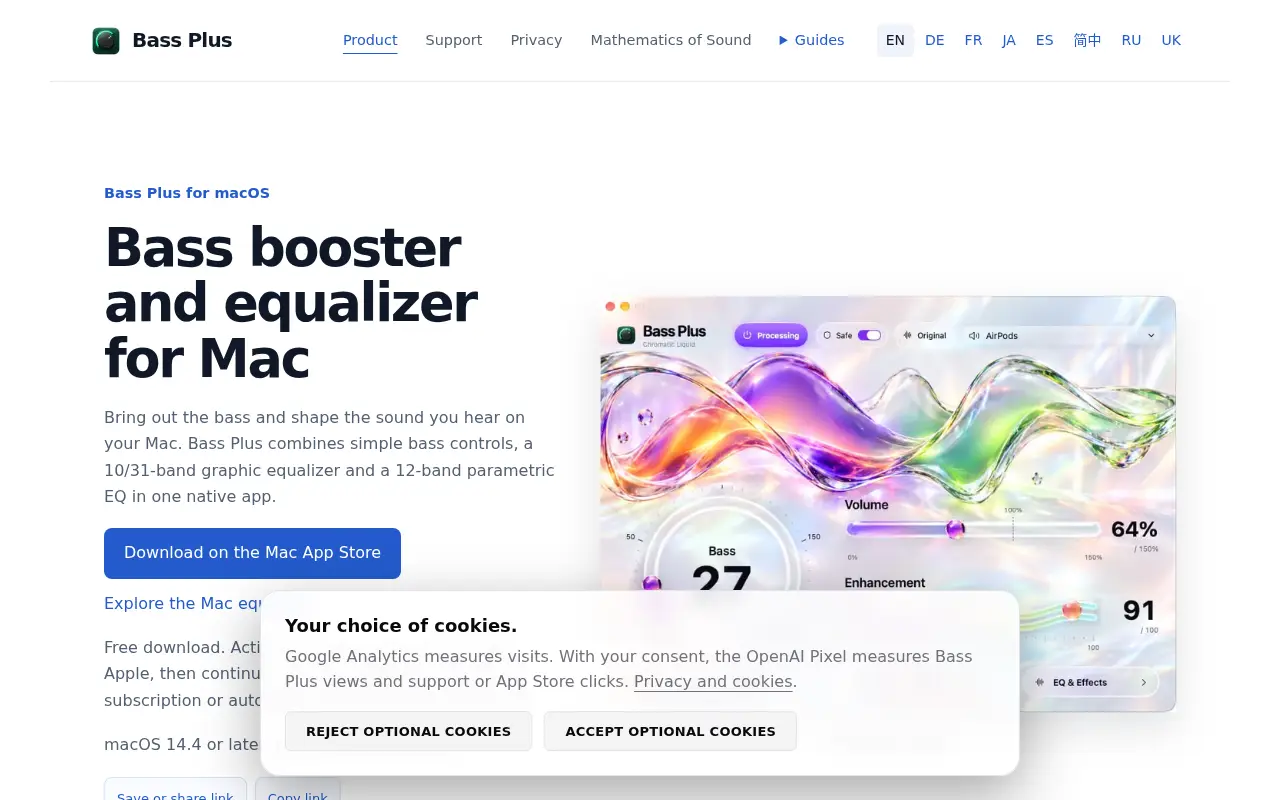
A native Mac bass booster with graphic and parametric EQ. Free 7-day trial, then a $14.99 lifetime unlock.
Laptop speakers and the missing low end
You know the moment. A song you love comes on through your MacBook speakers or a cheap pair of headphones, and the bass line that carries it has quietly gone missing. Bass Plus is a Mac app made for exactly that gap. It sits between your Mac and whatever you're listening on and lets you add back the low end, then shape the rest of the sound if you want to go further.
The quick route is a choice of four bass characters called Deep, Punch, Warm and Balanced, each with a slider for how much. The site sensibly suggests starting moderate and using Original Sound to compare, since small laptop speakers and full-size headphones react very differently to the same boost.
From one slider to a full equalizer
If you like tinkering, Sound Studio opens up a system-wide equalizer. You can pick a 10-band or 31-band graphic EQ, or switch to a 12-band parametric EQ with frequency, gain and Q controls. A/B comparison, a before-and-after spectrum and saved presets per output device make it practical for someone who swaps between speakers and headphones during the day.
There's a grab bag of listening tools too. Smart Enhance, Voice Lift, Clarity and Loudness handle everyday listening, and Sound Studio adds a Night mode, stereo width, simulated headphone space and pitch shifting without changing tempo. Volume can go past 100%, and the site is honest that more gain leaves less room for loud peaks. Its Safe setting limits added overload but can't make every recording clean.
The odd one out is Dictation Pause, and it's a thoughtful touch. When you start dictating, it notices microphone activity, fades and pauses supported Chrome or Safari playback, and resumes only what it paused. It needs macOS Automation permission and the browser's Allow JavaScript from Apple Events setting, and calls, live streams and some players aren't supported.
Before you install
Bass Plus is a free download from the Mac App Store with a full seven-day trial activated through Apple. After that, a lifetime unlock costs $14.99 in the US store, with no subscription and no automatic charge when the trial ends. Audio processing needs an active trial or purchase. It runs on macOS 14.4 or later, on both Apple Silicon and Intel, and doesn't need a separate audio driver.
According to its privacy policy, effective October 19, 2026, Bass Plus processes audio in your Mac's memory and doesn't save recordings or send audio to the developer. The app has no ads or third-party analytics SDKs. The website itself runs through Cloudflare and uses optional Google Analytics measurement, which the same policy describes. The app comes from CliDeck LLC, an Illinois company.
If you mostly listen on a MacBook and want fuller sound without learning audio software, the presets alone are worth the trial week. If you're on an older macOS than 14.4, or you want an equalizer for an iPhone or Windows PC, this one isn't for you.
Project note details
Dates and editorial links
Published
November 19, 2026
Updated
November 19, 2026
Last checked
Nov 19, 2026
Last checked is the most recent date Bass Plus's own public pages were visited for this note. Seen something that has changed since? Tell us and we'll fix it.
Note history
Publication and substantive update dates for this public note.
- Nov 19, 2026
- Project note published.
Want to come back to Bass Plus?
Save it to this browser. Your Saved list marks projects whose note or updates changed since you last looked.
Keep exploring
More like Bass Plus
- Oh My NotesApps · Floating Mac sticky notes and reminders saved as plain Markdown files on your computer, with no account and a one-time Pro upgrade.
- The NooksApps · The Nooks is a free-to-join community app for clubs, neighbors, families and shared-interest groups.
- LaneVertexApps · Combine Wi-Fi, tethered phones and Ethernet for faster downloads and uploads while calls stay smooth.
- Slot & ShaftApps · Free configurator for aluminum-extrusion desks and tables: pick a width, get a 3D model, a checked parts list and exact cut lengths.
- WePickedApps · WePicked helps a group choose a shared gift.
- XlistApps · Xlist is an app for iPhone, Android and the web that gathers saved videos from YouTube, TikTok, Instagram and other sources into one place.
- Little Rabbit HolesApps · Free reading feed of stories and curious facts that learns what you want more or less of.





For the makerAdd the badge to your site
If you made Bass Plus, you can post about this note with a ready-to-edit announcement, or show it on your own site with an optional badge that links back here. Neither changes the note's text or placement. This note's link to the project is marked as user-submitted until the project's site links back, for example with the badge, and is a full backlink while it does.

Want to keep this note's facts current yourself? Project Radar Pro lets a verified maker confirm status, pricing and platforms in a labeled block, post one update a month and see the note's activity totals. It never changes the note's text or placement. See what Pro includes
Building something useful?
Submit your project for free. If selected, it gets a Project Note that explains what it does and links to your work. Publication isn't guaranteed.
Submit a project