AudioEditDesk
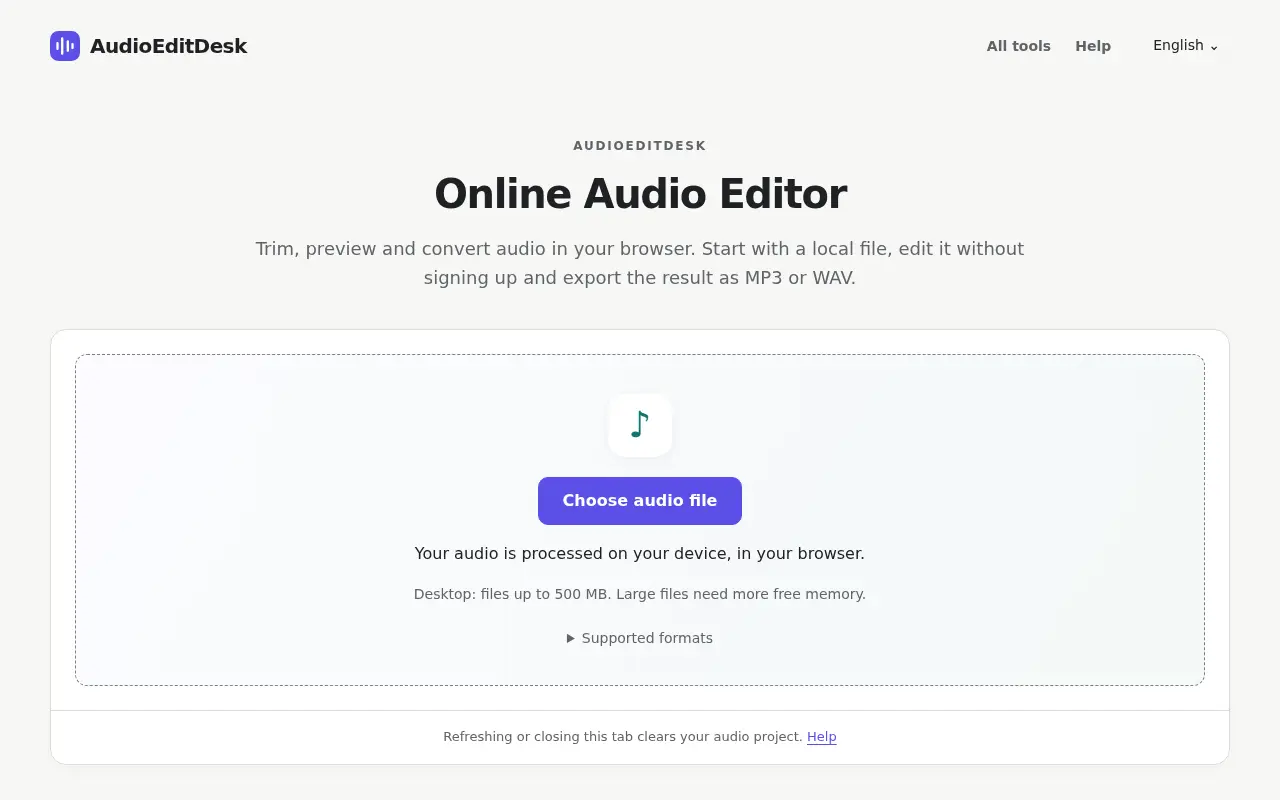
AudioEditDesk is a free browser audio editor for trimming, converting and adjusting one file at a time, with processing done on your own device.

Project links
Visit productRequest correctionProject Note
A closer look at AudioEditDesk
AudioEditDesk is a browser audio utility for trimming, converting between formats such as OGG and MP3, adjusting volume and fades, and exporting MP3 or WAV without an account.
One file, a few quick fixes
Sometimes you just need to trim the dead air off a recording or turn an OGG into an MP3, and a full editor feels like overkill. AudioEditDesk is built for that small job. You choose a file from your device, pick the section to keep, apply a change and export. It opens MP3, WAV, M4A and OGG files and exports MP3 or 16-bit WAV.
The cutter, converter and loudness normaliser cover the everyday jobs. There's also a volume changer and fade in and out, plus a few effects: reverb, a low-pass filter, distortion and a slowed and reverb effect.
Two tools go further. Instrumental maker and Acapella extractor separate the vocals from the backing track, for singing or practice. Source files there are limited to 10 minutes and 100 MB, and the page warns that processing can take several minutes, or longer than the song on a phone. The terms ask you to use audio you own or have permission to edit.
Limits worth knowing
In the main editor, desktop files can be up to 500 MB and mobile files up to 100 MB, and large files need more free memory. It works on one file at a time.
Refreshing or closing the tab clears your project, so download what you want to keep.
Before you drop a file in
The tools are free from editing to download, with no account. According to the privacy page, audio files are processed in your browser and aren't uploaded to the site's servers. Google Analytics is used, and the same page explains that it records general details such as format and size range but not your audio or filename.
That privacy page carries no date. The site is signed by Jack with a support email, and no company is named. For a quick trim or conversion, it's worth a bookmark.
Project note details
Dates and editorial links
Published
November 11, 2026
Updated
November 12, 2026
Note history
Publication and substantive update dates for this public note.
- Nov 11, 2026
- Project note published.
- Nov 12, 2026
- Project note updated.
Want to come back to AudioEditDesk?
Save it to this browser. Your Saved list marks projects whose note or updates changed since you last looked.
Keep exploring
More like AudioEditDesk
- RapLyricsCreator Tools · RapLyrics is a free, no-sign-up rap writing page that produces editable 4, 8 or 16-bar starter verses, finds rhymes and exports your lyrics as text.
- Audio Enhancer AIAI & Skills · A browser tool that reduces background noise and sharpens speech in recordings, free for audio up to 10 minutes.
- AudioDingCreator Tools · A free set of in-browser audio tools for trimming, converting, tuning and transcribing, where files stay on your device instead of being uploaded.
- sync.videoCreator Tools · A free browser tool that finds and fixes audio delay, syncs separate recordings by their sound and saves a new file with the picture untouched.
- AudioMIDICreator Tools · AudioMIDI is a free browser tool that converts MP3, WAV and other audio files into editable MIDI.
- Song SlowerCreator Tools · Song Slower is a free browser audio editor for practice and slowed or sped-up edits.
- jsonl.coDeveloper Tools · jsonl.co is a free in-browser JSONL viewer and editor for files up to 1 GB, with validation, converters and no uploads.
- metadata.videoUtilities & Calculators · A free metadata viewer, editor and remover for video and photo files.


For the makerAdd the badge to your site
If you made AudioEditDesk, you can post about this note with a ready-to-edit announcement, or show it on your own site with an optional badge that links back here. Neither changes the note's text or placement. This note's link to the project is marked as user-submitted until the project's site links back, for example with the badge, and is a standard link while it does.

Want to keep this note's facts current yourself? Project Radar Pro lets a verified maker confirm status, pricing and platforms in a labeled block, post one update a month and see the note's activity totals. It never changes the note's text or placement. See what Pro includes
Building something useful?
Submit your project for free. If selected, it gets a Project Note that explains what it does and links to your work. Publication isn't guaranteed.
Submit a project