sync.video
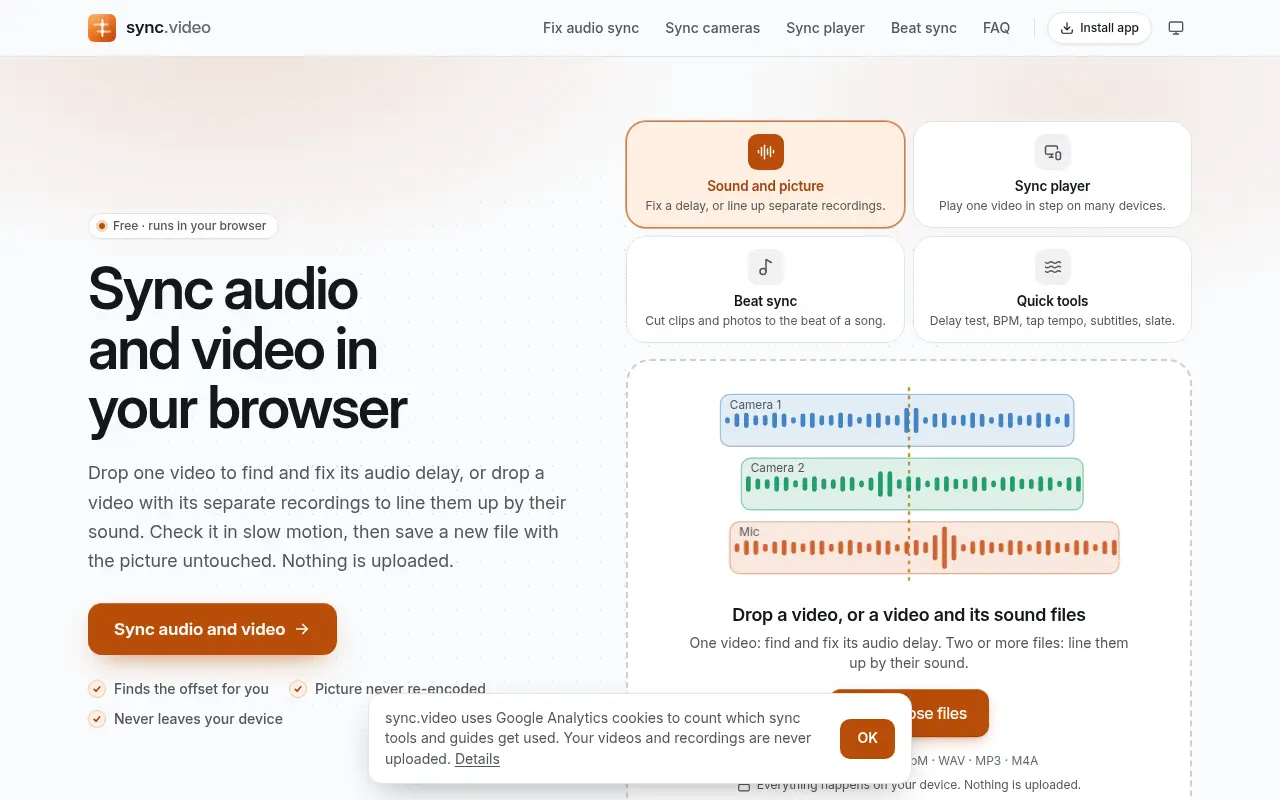
sync.video lines up sound and picture in your browser, from a single clip with a delay to several cameras and a separate recorder, without re-encoding the picture.

Project links
Visit productRequest correctionProject Note
A closer look at sync.video
A free browser tool that finds and fixes audio delay, syncs separate recordings by their sound and saves a new file with the picture untouched. Nothing is uploaded.
When the sound and the picture drift apart
You filmed an interview on a camera and recorded the voice on a separate microphone, and now the two files have to be lined up. Or you have a single video whose sound arrives late, thanks to a Bluetooth microphone or an export setting. sync.video is a free browser tool that handles both cases.
For the first, you drop the video and the recording in together, and it lines them up by matching the shape of their sound. The site says that's accurate to well under a millisecond on clean audio, and it works with two to eight cameras and recorders at once.
For the second, Detect automatically looks for sharp moments, like a clap or a slate closing, in both the picture and the sound, and suggests a delay with a confidence figure. When it can't tell, you step to the frame where the hands meet and mark it as the clap. Playback slows to a quarter speed around that moment, and you can nudge the sound earlier or later in 10 ms or 1 ms steps.
There's also a difference between a fixed offset and drift, where the gap grows as the video plays because two clocks ran at slightly different speeds. A drift fix stretches the sound between two sync points.
The picture stays as it was
When only the timing changes, sync.video copies the compressed picture and sound into a new file with the sound's timestamps shifted. Nothing is decoded, so there's no quality loss and a long video is written in seconds. Drift fixes and mixes re-encode the sound, but the picture is still copied. It opens MP4, MOV, MKV and WebM files, along with WAV, MP3 and M4A.
The team behind sync.video says the usual way to fix lip-sync or line up a separate microphone is scrubbing waveforms by hand in an editor, or paying for a desktop tool such as PluralEyes. They built this one to find the offset from the shared sound and export in a browser tab, with no upload.
They're also plain about its limits. Automatic detection works best on clean sound with a clear clap or hit, and noisy or very quiet recordings may need the manual clap frame. For multicam work it lines the files up and hands over an FCPXML or Premiere XML file. It isn't a multicam editor.
Other tools sit on the same site. There's a beat-sync maker that cuts clips and photos on the beats of a song, a BPM finder and tap tempo counter, and a subtitle timing fixer for SRT and VTT files. You'll also find an audio delay test, a clapperboard for your phone, and a sync player that plays one video in step across several devices.
What leaves your device
It's free, with no account or watermark. The privacy page, updated November 7, 2026, says files are read, analysed and written inside your browser tab and never uploaded.
The sync player is the one tool that talks to a server. Each device opens its own copy of the video, and a relay the site runs on Cloudflare introduces the devices and passes on play, pause and clock messages. The relay sees the room code, any device name you give and the connection details browsers exchange, including IP addresses. It keeps only the room code and its timing, deleted when the room closes or after 12 hours at most.
Google Analytics sets cookies and records which tools were used, never the files themselves, with advertising signals denied. It can be turned off from any page. If you've got an interview with a separate recorder or a clip with a nagging delay, drop it in and see what the automatic detection suggests.
In their words
From the team behind sync.video
“sync.video was built to find the offset automatically from the shared sound and export in a browser tab, without uploading the footage.”
“Automatic detection works best on clean sound with a clear clap or hit; noisy or very quiet recordings may need the manual clap frame.”
For reference
Project facts
The published details and source context, together in one place.
- Stage
- Launched
Project note details
Dates and editorial links
Published
November 9, 2026
Updated
November 12, 2026
Note history
Publication and substantive update dates for this public note.
- Nov 9, 2026
- Project note published.
- Nov 12, 2026
- Project note updated.
Want to come back to sync.video?
Save it to this browser. Your Saved list marks projects whose note or updates changed since you last looked.
Keep exploring
More like sync.video
- audiogram.videoCreator Tools · A free audiogram maker for podcast clips and songs.
- recorder.videoCreator Tools · Record your screen, a tab, your webcam and your voice together or separately, trim the take and export MP4, WebM, audio or a GIF, all in the browser.
- metadata.videoUtilities & Calculators · A free metadata viewer, editor and remover for video and photo files.
- stabilize.videoCreator Tools · A free browser video stabilizer with presets for walking, driving, drones and rolling-shutter wobble.
- FORMWEFT Motion WorkbenchCreator Tools · A browser workbench for adding timed captions and animated information cards to an existing video.
- Audio Enhancer AIAI & Skills · A browser tool that reduces background noise and sharpens speech in recordings, free for audio up to 10 minutes.
- SealedPocket (formerly ZeroNet Space)Apps · An iPhone and iPad vault for photos, files, notes and recordings that needs no account, now with a photo diary that puts pictures between paragraphs.
- AudioEditDeskCreator Tools · AudioEditDesk is a free browser audio editor for trimming, converting and adjusting one file at a time, with processing done on your own device.




For the makerAdd the badge to your site
If you made sync.video, you can post about this note with a ready-to-edit announcement, or show it on your own site with an optional badge that links back here. Neither has any effect on the note or its placement.

Want to keep this note's facts current yourself? Project Radar Pro lets a verified maker confirm status, pricing and platforms in a labeled block, post one update a month and see the note's activity totals. It never changes the note's text or placement. See what Pro includes
Building something useful?
Submit your project for free. If selected, it gets a Project Note that explains what it does and links to your work. Publication isn't guaranteed.
Submit a project