stabilize.video
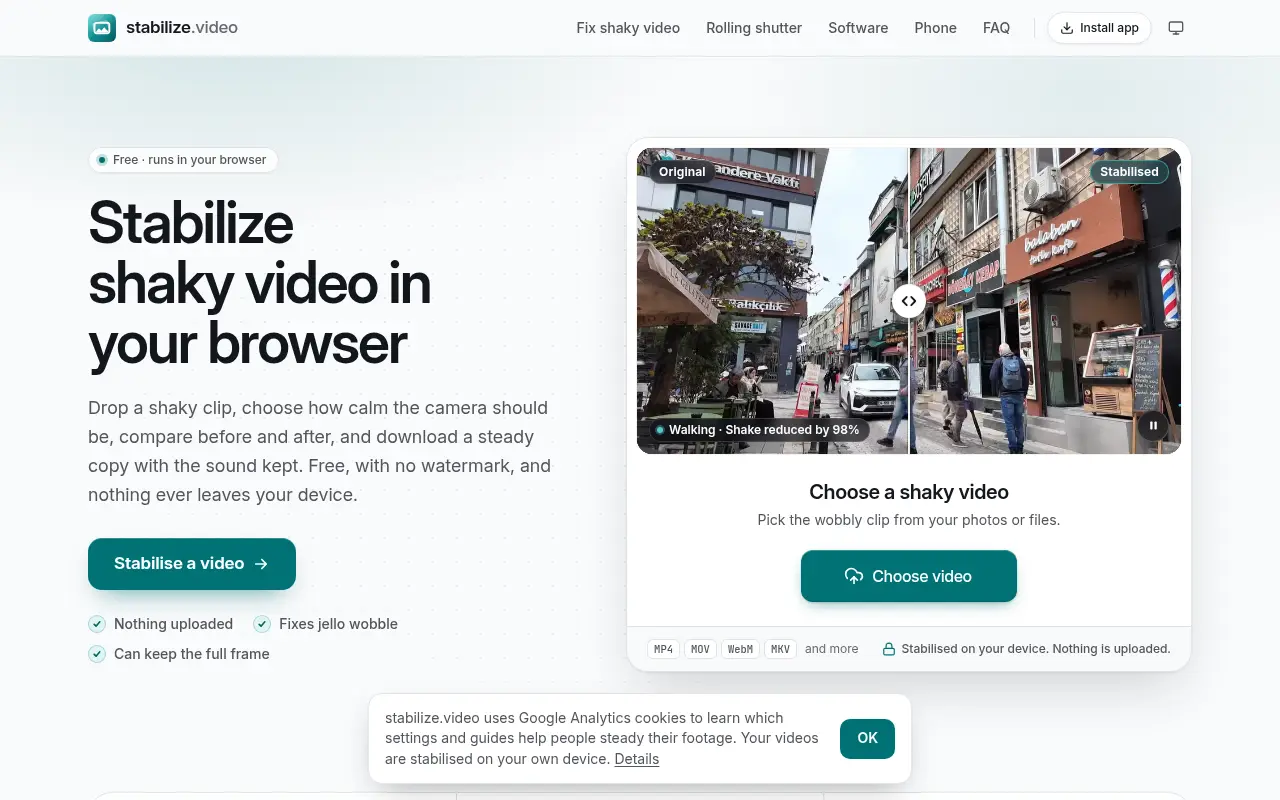
stabilize.video steadies shaky phone, action-camera and drone clips in your browser, with twelve presets, a before-and-after view and no upload.

Project links
Visit productRequest correctionProject Note
A closer look at stabilize.video
A free browser video stabilizer with presets for walking, driving, drones and rolling-shutter wobble. Your clip is processed on your device and never uploaded.
The clip was great until you watched it back
You filmed something while walking, or out of a car window, or from a drone on a breezy day. In the moment it looked fine. Played back, the whole frame jitters.
stabilize.video takes that shaky clip from a phone, action camera or drone and saves a steadier copy with the sound kept. You drop the clip in, it analyses the motion, and you choose how the shot was filmed from twelve presets. Walking, Running, Vehicle and Drone are among them, alongside Tripod, Cinematic and Timelapse, plus a Jelly fix for rolling-shutter wobble. A split view with a divider you drag shows before and after, and the page tells you how much of the shake was removed and how far the picture zoomed in to do it.
The home page says none of this is AI. The tool follows a few hundred points from frame to frame, works out the path the camera took, plans a calmer one within your Zoom limit, and redraws each frame on your graphics chip.
The team behind it says good stabilisation usually lives inside paid editors, such as Premiere Pro's Warp Stabilizer, or in apps that upload the clip. They built this to steady footage after the fact, from any phone or camera, in the browser.
The dials worth touching
Camera sets the style of the new path. Smooth keeps your pans, Cinematic holds still and then moves in straight glides, and Locked pins the shot in place like a tripod. You can pick which movements to remove, so a deliberate tilt or zoom survives, and Keep horizon level holds the rotation steady.
Framing decides what happens at the moving edges, from one steady crop to a Full frame mode that fills gaps with a blurred, mirrored or repeated edge. Ignore an area keeps a dashboard or a timestamp out of the tracking, a thoughtful extra for car footage.
Exports are MP4 or WebM, with H.264, HEVC, VP9 or AV1 depending on what your browser can encode. You can also save a side-by-side or split before-and-after video, or a single still frame.
Before you drop a clip in
The site is plain about what it can't fix. Motion blur from a sudden jolt stays in the frame. Steadying either zooms in a little or fills the edges, because it can't recover picture from outside the shot. Clear sky, fog, open water and night scenes are harder to track. HDR and 10-bit clips are saved as 8-bit standard video, and long 4K clips are slow on a phone and can run out of memory there.
The team adds one more limit of their own. It works from the picture alone, so it doesn't use gyro data the way Gyroflow can, and very fast motion blur baked into the frames can't be removed.
It's free, with no account or watermark. The privacy page, updated November 8, 2026, says the site runs no server that could accept your video, so the clip, its sound and its metadata stay on your device. Up to ten projects are kept in your browser's storage until you delete them. Google Analytics sets cookies, with advertising features off, and can be turned off under Cookie settings. The site shows no adverts. If there's a wobbly holiday clip sitting on your phone, this is an easy place to give it a second chance.
In their words
From the team behind stabilize.video
“stabilize.video was built to steady footage after the fact, from any phone or camera, entirely in the browser.”
“It works from the picture alone with classical computer vision, so it does not use gyro data the way Gyroflow can, and very fast motion blur baked into frames cannot be removed.”
For reference
Project facts
The published details and source context, together in one place.
- Stage
- Launched
Project note details
Dates and editorial links
Published
November 9, 2026
Updated
November 12, 2026
Note history
Publication and substantive update dates for this public note.
- Nov 9, 2026
- Project note published.
- Nov 12, 2026
- Project note updated.
Want to come back to stabilize.video?
Save it to this browser. Your Saved list marks projects whose note or updates changed since you last looked.
Keep exploring
More like stabilize.video
- sync.videoCreator Tools · A free browser tool that finds and fixes audio delay, syncs separate recordings by their sound and saves a new file with the picture untouched.
- ExportFramesCreator Tools · A free browser tool that extracts PNG or JPG frames from a video file without uploading it.
- InstaGridMakerCreator Tools · InstaGridMaker splits one photo into numbered tiles for an Instagram profile grid, sized for the 3:4 layout, with the cutting done in your browser.
- ArtluniCreator Tools · Artluni is an AI critique tool for photographs, paintings and drawings that returns strengths, prioritised fixes and an exercise, pinned to the image.
- StitchidyCreator Tools · Stitchidy is a Windows desktop organizer for machine-embroidery design collections, with grouping by design, hoop fit and optional AI labelling for search.
- CameraWatermarkCreator Tools · CameraWatermark adds a gallery-style caption to a photo with the camera, lens and exposure settings read from its EXIF data.
- AudioEditDeskCreator Tools · AudioEditDesk is a free browser audio editor for trimming, converting and adjusting one file at a time, with processing done on your own device.





For the makerAdd the badge to your site
If you made stabilize.video, you can post about this note with a ready-to-edit announcement, or show it on your own site with an optional badge that links back here. Neither has any effect on the note or its placement.

Want to keep this note's facts current yourself? Project Radar Pro lets a verified maker confirm status, pricing and platforms in a labeled block, post one update a month and see the note's activity totals. It never changes the note's text or placement. See what Pro includes
Building something useful?
Submit your project for free. If selected, it gets a Project Note that explains what it does and links to your work. Publication isn't guaranteed.
Submit a project