ExportFrames
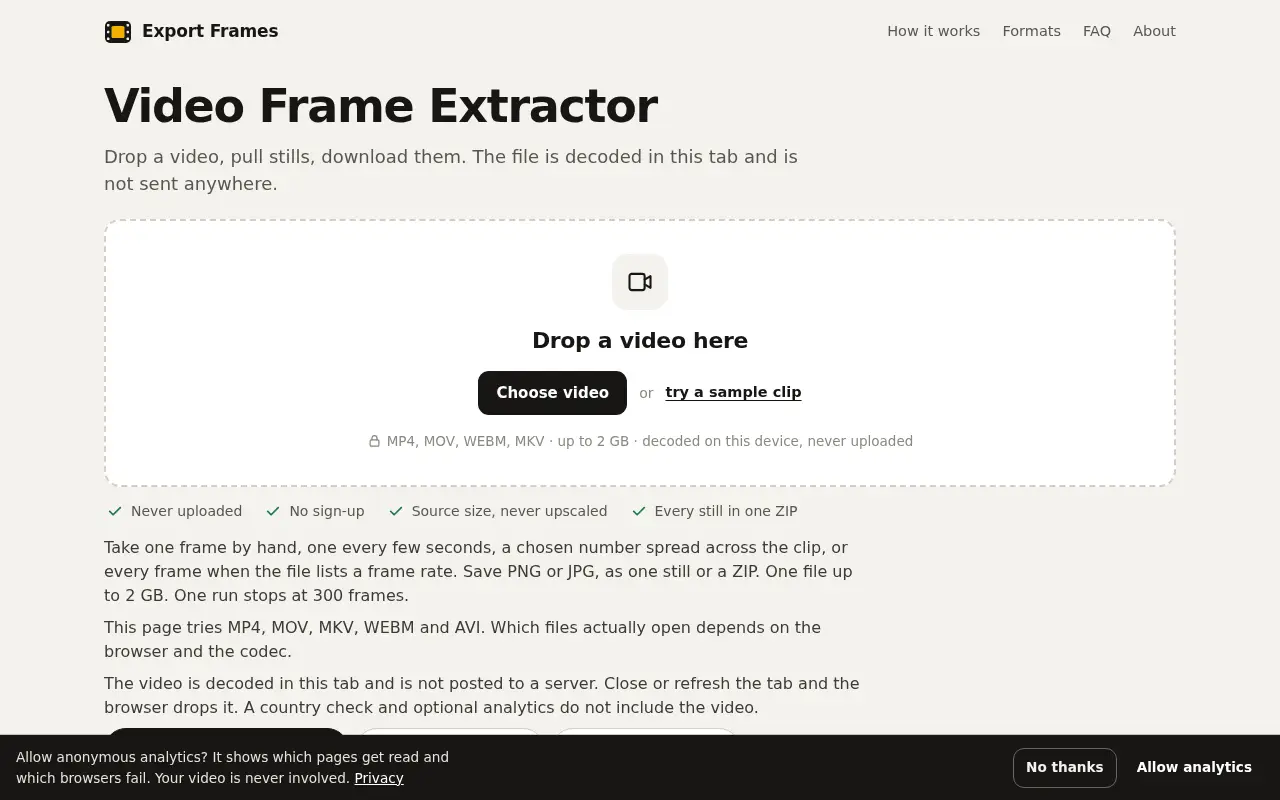
ExportFrames pulls still frames out of a video in your browser and saves them as PNG or JPG. The file isn't uploaded, and there's no sign-up.

Project links
Visit productRequest correctionProject Note
A closer look at ExportFrames
A free browser tool that extracts PNG or JPG frames from a video file without uploading it.
Stills from a video you already have
Say you need a thumbnail, a storyboard or a few reference frames from a clip. Pausing and screenshotting gets old fast, and opening a full editor for a handful of stills feels like too much. ExportFrames lets you drop the file onto a web page and pull the frames right there. It's free and there's no sign-up.
You get four ways to choose. You can scrub to one frame by hand, take one every few seconds, ask for a chosen number spread across the clip, or grab every frame when the file lists a frame rate. Stills come out as PNG or JPG at the source size, one at a time or together in a ZIP.
The file stays in the tab
The site's main claim is that the video is "decoded in this tab and is not posted to a server." Its privacy page backs that up, saying the page contains no upload request and that closing or refreshing the tab drops the file. The page doesn't bundle FFmpeg. It relies on whatever video decoding your browser already ships and draws each frame onto a canvas.
That choice has a cost, and the site is upfront about it. Which files open depends on your browser and the codec inside the file. The page tries MP4, MOV and MKV files, along with WEBM and AVI. Its own published test results are from September 2026 in Chrome on macOS, and Safari and Firefox haven't been tested yet. If a clip won't open, trying another browser or re-encoding the file is the likely fix.
A few limits worth knowing first
It handles one video at a time, up to 2 GB, and a single run stops at 300 frames. For a long clip that means choosing a wider interval or working in sections.
On the privacy side, the site's privacy page describes Google Analytics page views and a country check, and says neither includes the video. No ads run today, though the site plans to add third-party ads to its written sections later. One person runs it under the site name, with no company behind it, and there's a contact email if something breaks. If you make thumbnails or storyboards and would rather not upload your footage anywhere, it's worth a bookmark.
Project note details
Dates and editorial links
Published
November 11, 2026
Updated
November 12, 2026
Note history
Publication and substantive update dates for this public note.
- Nov 11, 2026
- Project note published.
- Nov 12, 2026
- Project note updated.
Want to come back to ExportFrames?
Save it to this browser. Your Saved list marks projects whose note or updates changed since you last looked.
Keep exploring
More like ExportFrames
- InstaGridMakerCreator Tools · InstaGridMaker splits one photo into numbered tiles for an Instagram profile grid, sized for the 3:4 layout, with the cutting done in your browser.
- chart.videoCreator Tools · A free animated chart maker that runs in your browser.
- FORMWEFT Motion WorkbenchCreator Tools · A browser workbench for adding timed captions and animated information cards to an existing video.
- AudioDingCreator Tools · A free set of in-browser audio tools for trimming, converting, tuning and transcribing, where files stay on your device instead of being uploaded.
- quote.videoCreator Tools · A free quote video maker with more than 410 animated templates, a full layer editor, music and optional voiceover, exporting MP4 or images for every social size.
- MergePNGUtilities & Calculators · MergePNG combines several PNG files into one image, side by side, stacked or in a grid, inside your browser without uploading them.
- collage.videoCreator Tools · collage.video combines photos and video clips into one frame, with 35 layouts and your own music, and saves a 1080p video without uploading anything.
- AprireP7MUtilities & Calculators · AprireP7M is an Italian-language browser tool for opening and reading P7M files locally, without uploading documents or creating an account.






For the makerAdd the badge to your site
If you made ExportFrames, you can post about this note with a ready-to-edit announcement, or show it on your own site with an optional badge that links back here. Neither changes the note's text or placement. This note's link to the project is marked as user-submitted until the project's site links back, for example with the badge, and is a standard link while it does.

Want to keep this note's facts current yourself? Project Radar Pro lets a verified maker confirm status, pricing and platforms in a labeled block, post one update a month and see the note's activity totals. It never changes the note's text or placement. See what Pro includes
Building something useful?
Submit your project for free. If selected, it gets a Project Note that explains what it does and links to your work. Publication isn't guaranteed.
Submit a project