audiogram.video
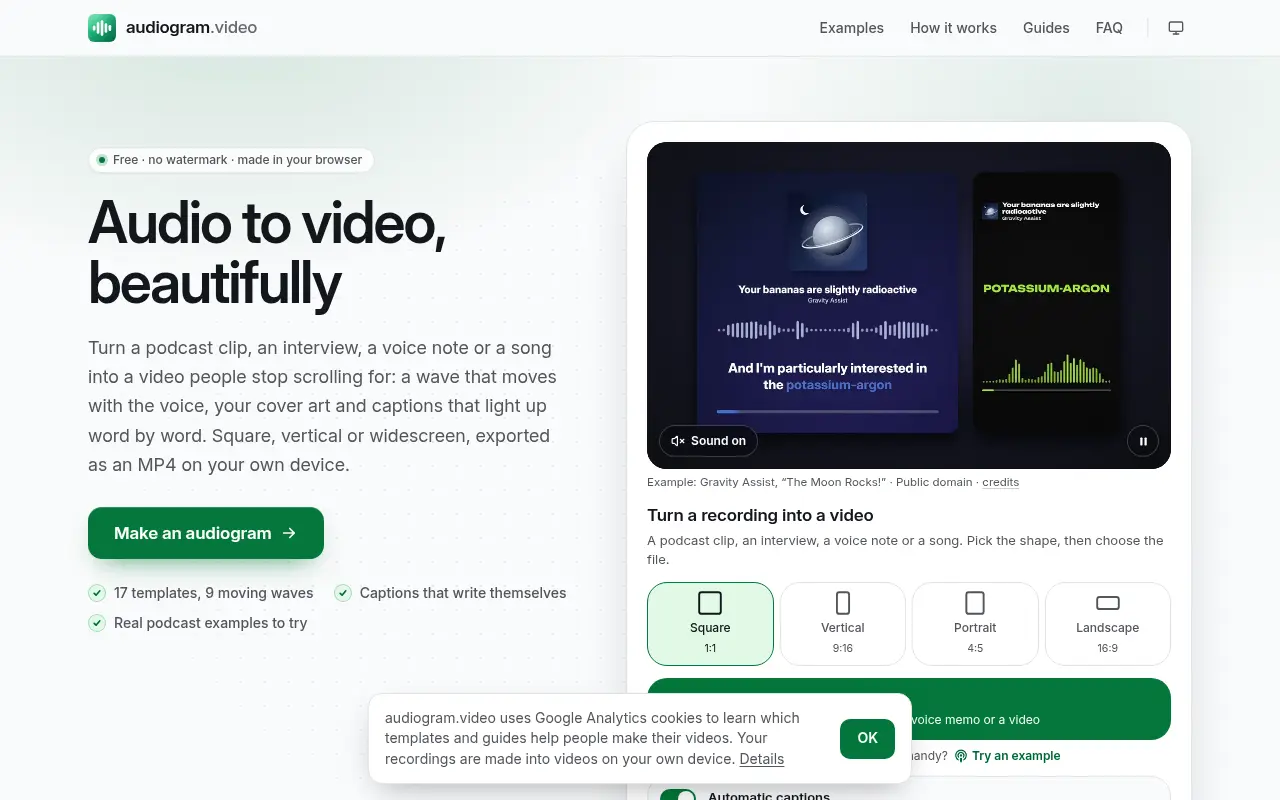
audiogram.video turns a podcast clip, voice note or song into a video with a moving waveform, cover art and word-by-word captions, free and without a watermark.
Project links
Visit productRequest correctionProject Note
A closer look at audiogram.video
A free audiogram maker for podcast clips and songs. The video is made in your browser; only caption audio goes to a speech service, and you can switch that off.
Your best minute of audio needs a picture
You've recorded a great episode and want to share the best moment of it. Then you remember that Instagram and YouTube only play sound inside a video, so a podcast clip, an interview or a song needs a picture before you can post it. audiogram.video makes that video. You open a recording, choose the moment, and it draws a waveform that moves with the voice, your cover art and a title, plus captions that light up word by word as they're spoken.
The team behind it points to a simple problem. Platforms like Instagram, TikTok and LinkedIn don't play audio by itself, so podcasters need short video clips to promote episodes, and the usual audiogram tools are subscriptions with watermarks on their free plans.
Picking the moment and the look
Best 30 s or Best 60 s jumps to a lively stretch of talking, which saves you scrubbing through an hour of tape. One video can be up to 10 minutes long. There are 17 templates and nine wave styles, in square, vertical, 4:5 and widescreen shapes. Colours follow your cover art, and a look you like can be saved under My styles for the next episode.
Captions can be corrected by typing over them, and they come in a Highlight, Pop, Box or Plain style. You can also download them as SRT or VTT for another editor. The export is an MP4 at 1080p or 720p, at 30 or 60 frames per second.
What leaves your device, and what it costs
Captions are the one step that leaves your device. With Automatic captions on, which is the default, the sound of the chosen clip is mixed to mono, compressed and sent through the site's server to DeepInfra, a US company running the Whisper speech-recognition model. When a recording first opens, that's up to 75 seconds of audio. The privacy page, updated November 9, 2026, says neither the site nor DeepInfra keeps the audio or the words, and your pictures, file name and the rest of the project aren't passed on.
Turn Automatic captions off and nothing is sent unless you press Transcribe. You can also type the captions yourself or open an SRT or VTT file. The team puts the trade-off the same way the privacy page does: with automatic captions switched off nothing leaves the device, but you then type the captions yourself.
There's no account, payment or watermark. The FAQ gives two limits: 10 minutes per video, and fair-use limits on captions. Per the privacy page, those are counted per connection using a one-way fingerprint of your IP address that's deleted after two days.
The example clips on the home page come from public-domain and Creative Commons podcasts, so you can try every control before opening a recording of your own. If you have an episode to promote this week, that's a good place to start.
In their words
From the team behind audiogram.video
“audiogram.video was built to make a captioned waveform clip free in the browser.”
“with automatic captions switched off nothing leaves the device, but you then type captions yourself.”
For reference
Project facts
The published details and source context, together in one place.
- Stage
- Launched
Project note details
Dates and editorial links
Published
November 9, 2026
Updated
November 12, 2026
Note history
Publication and substantive update dates for this public note.
- Nov 9, 2026
- Project note published.
- Nov 12, 2026
- Project note updated.
Want to come back to audiogram.video?
Save it to this browser. Your Saved list marks projects whose note or updates changed since you last looked.
Keep exploring
More like audiogram.video
- thankyou.videoCreator Tools · A free thank-you video maker for teachers, teams, customers and family, with an end-slide option for presentations.
- AudioDingCreator Tools · A free set of in-browser audio tools for trimming, converting, tuning and transcribing, where files stay on your device instead of being uploaded.
- WatchToTextUtilities & Calculators · A free tool that turns a public YouTube link into a transcript you can copy or download as TXT, SRT or VTT.
- TokScriptCreator Tools · TokScript is a transcript tool for short-form video.
- HiliteCreator Tools · A browser service for recording or uploading podcast audio, editing its transcript, enhancing speech and preparing episodes for publication.
- boomerang.videoCreator Tools · A free boomerang maker for clips you've already shot.
- ExportFramesCreator Tools · A free browser tool that extracts PNG or JPG frames from a video file without uploading it.
- InstaGridMakerCreator Tools · InstaGridMaker splits one photo into numbered tiles for an Instagram profile grid, sized for the 3:4 layout, with the cutting done in your browser.





For the makerAdd the badge to your site
If you made audiogram.video, you can post about this note with a ready-to-edit announcement, or show it on your own site with an optional badge that links back here. Neither has any effect on the note or its placement.

Want to keep this note's facts current yourself? Project Radar Pro lets a verified maker confirm status, pricing and platforms in a labeled block, post one update a month and see the note's activity totals. It never changes the note's text or placement. See what Pro includes
Building something useful?
Submit your project for free. If selected, it gets a Project Note that explains what it does and links to your work. Publication isn't guaranteed.
Submit a project