
Steam Design Tools
Browser tools for Steam profile designers: a showcase background cropper, a browsable Points Shop background library, and converters for GIF and APNG artwork.
Project links
Visit productRequest correctionProject Note
A closer look at Steam Design Tools
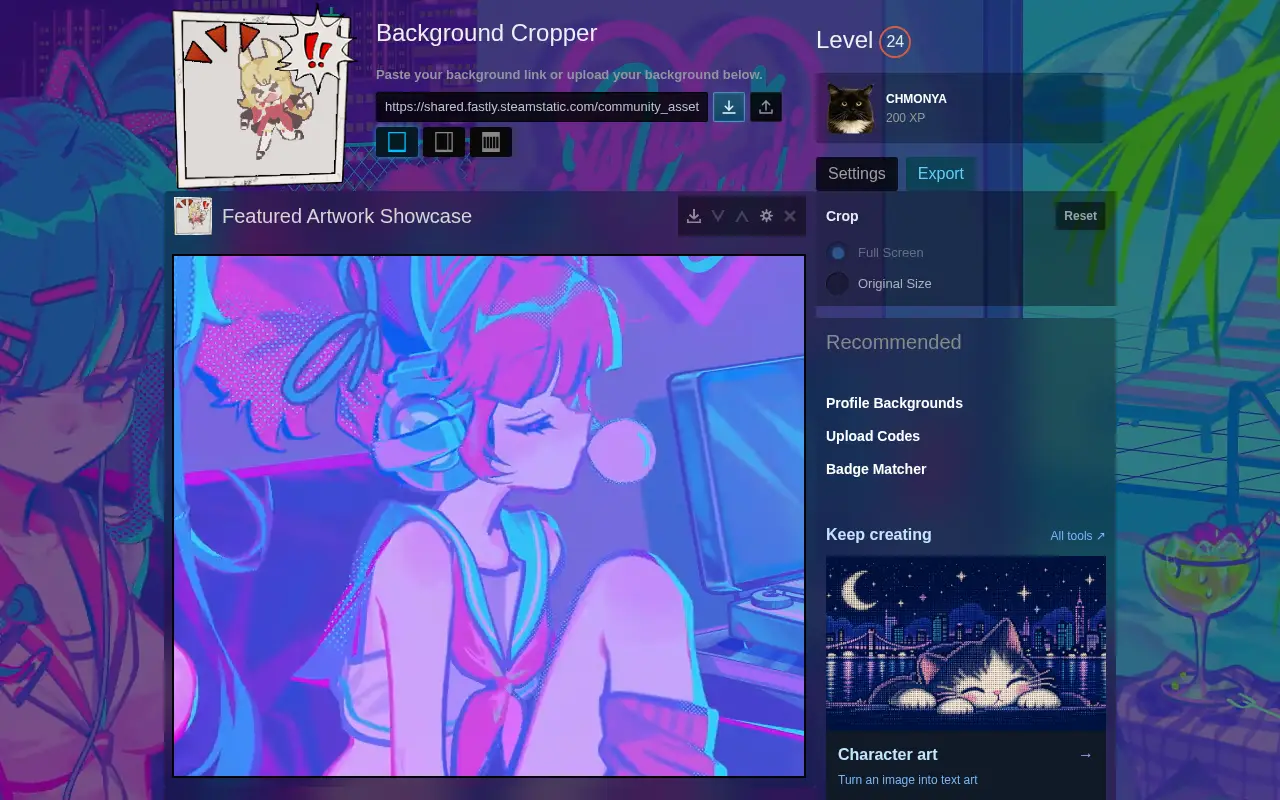
Steam Design Tools helps you build a custom Steam profile. Paste your profile background or upload it, choose the showcase type and display mode, and export slices that line up with the background. Extra tools cover a Points Shop background library, BBCode text, GIF and APNG conversion and compression.
When the showcase almost lines up
Anyone who has built a fancy Steam profile knows the moment. The artwork showcase is meant to flow into the background behind it, and instead there's a visible seam a few pixels off. You re-crop, re-upload, and it's still not quite right, because the slice sizes change depending on the showcase and on how Steam displays the background.
Steam Design Tools is built around that problem. You paste the link to the background your profile uses, or upload the file, choose the showcase type and whether your background shows Full Screen or at Original Size, and export the slices. Featured Artwork gives one wide slice, Artwork gives a main and a narrow side slice, and Workshop gives five groups. The page walks you through what each choice does, and its FAQ is full of fixes for the usual mistakes, such as cropping in the wrong display mode.
The rest of the kit
Around the cropper sit smaller tools for the same hobby. A background library lets you browse 1,648 Points Shop backgrounds before you buy one. There's a BBCode editor for formatted profile text, an MP4-to-GIF converter and an APNG maker. Compressors for images and video and a helper for transparent images round it out. The instructions are careful about Steam's own limits, such as the 5 MB cap on artwork uploads and the fact that APNG animation should be checked on Steam before you rely on it.
It's also clear that the crop files can't unlock anything. Showcase slots depend on your Steam level and Points Shop upgrades, so it's worth checking you have the slot before designing for it.
Before you start
No sign-in is needed, and the site says it never asks for Steam passwords or payment details. According to its privacy policy, updated October 10, 2026, files you upload are processed in your browser and not sent to its server, while public Steam media may pass through a proxy route so it can be displayed. Settings are saved in your browser. Google Analytics and Microsoft Clarity measure page use, and no advertising is set up. The site states it isn't affiliated with Valve or Steam, and the background library shows Valve's own public media. No price appears anywhere, and the site names no one behind it, only a contact email.
If you've ever fought a crooked showcase, this will save you an evening. If you don't customise your Steam profile, there's nothing here for you.
Project note details
Dates and editorial links
Published
November 21, 2026
Updated
November 21, 2026
Last checked
Nov 21, 2026
Last checked is the most recent date Steam Design Tools's own public pages were visited for this note. Seen something that has changed since? Tell us and we'll fix it.
Note history
Publication and substantive update dates for this public note.
- Nov 21, 2026
- Project note published.
Want to come back to Steam Design Tools?
Save it to this browser. Your Saved list marks projects whose note or updates changed since you last looked.
Keep exploring
More like Steam Design Tools
- UseCADCraftCreator Tools · Free online DXF viewer and 2D CAD editor built on the open-source CADCraft engine.
- NOIRADIX StudioDeveloper Tools · A free browser pixel art editor for sprite sheets and animation clips, with Unity and TexturePacker-style exports.
- CatalogBridgeUtilities & Calculators · Offline tool that maps a supplier CSV into a draft Shopify-style CSV, plus one custom mapping profile.
- VertovCreator Tools · Browser screen recorder with transcript editing, timestamped comments on share links, AI summaries and an MCP server for agents.
- StemTabCreator Tools · AI stem separation and audio-to-score for musicians: isolate parts, export MIDI or sheet music.
- ShipnameCreator Tools · Free ship name generator that blends two to five names into pairing names, concept names and tags, plus a yumeship card maker.
- GetTextToSpeechCreator Tools · Free browser text-to-speech with six English voices, a speed control and MP3 download, no sign-up.
- BlockPoster.aiCreator Tools · A browser tool that splits a photo into printable sheets for a big DIY poster, with overlap marks and an assembly guide.



For the makerAdd the badge to your site
If you made Steam Design Tools, you can post about this note with a ready-to-edit announcement, or show it on your own site with an optional badge that links back here. Neither changes the note's text or placement. This note's link to the project is marked as user-submitted until the project's site links back, for example with the badge, and is a full backlink while it does.

Want to keep this note's facts current yourself? Project Radar Pro lets a verified maker confirm status, pricing and platforms in a labeled block, post one update a month and see the note's activity totals. It never changes the note's text or placement. See what Pro includes
Building something useful?
Submit your project for free. If selected, it gets a Project Note that explains what it does and links to your work. Publication isn't guaranteed.
Submit a project