
Vertov
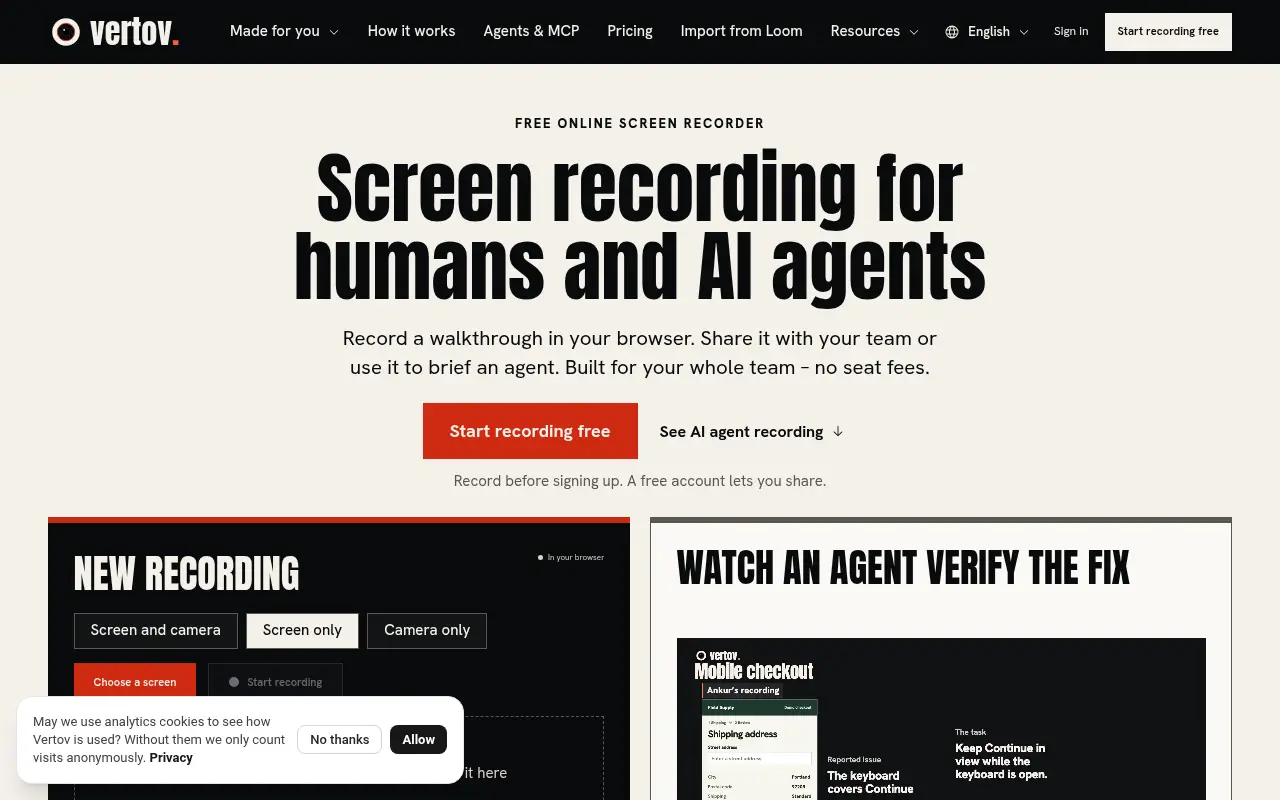
Record your screen and camera in the browser, cut the video by deleting words from its transcript, and share a link people can comment on. Free plan included.
Project links
Visit productRequest correctionProject Note
A closer look at Vertov
Browser screen recorder with transcript editing, timestamped comments on share links, AI summaries and an MCP server for agents. Free plan available.
The walkthrough you'd rather not explain twice
Someone asks how to file an expense or where a setting lives, and you can either write three paragraphs or show them in ninety seconds. Vertov is for the second option. You record your screen, camera and mic straight from the browser or a Chrome extension, then share a link that plays right away.
The editing is the part worth a closer look. Every recording gets a transcript, and you cut the video by deleting words from it, so the "um, wait, wrong tab" moment disappears without a timeline. You can also add zooms, blur something private, trim and stitch clips together.
Recordings that people and agents can use
Shared links take comments pinned to a moment in the video, and you can add a password or an expiry date. AI features write titles, summaries and chapters, or turn a recording into a document such as a standard operating procedure. Vertov also leans into AI agents: an MCP server and an API let an agent read your videos or upload recordings, and a "Copy for an AI agent" option packages a video as a brief. If you're moving from Loom, there's an importer.
You can start recording as a guest without signing in. Saving the account with a passkey, Google or an email link is what starts the trial and the AI runs, and you'll need that before you share links.
Before you hit record
The free plan is generous for occasional use: 180 minutes of library shared by the workspace, videos up to 15 minutes, a small monthly allowance of AI runs, and a "Made with Vertov" end card on downloaded MP4s. One thing to know is that free workspaces delete videos nobody else has watched in 90 days, after two email warnings. Pro is $9 a month or $90 a year with 25 hours of library and six-hour videos, Team is $29 a month, and Business starts at $99. New workspaces get a 14-day trial of the paid features with no card.
According to its privacy policy, when AI features run, a recording's audio and transcript go to outside providers: Groq for speech to text, with Cloudflare Workers AI as a backup, and Anthropic for titles, summaries and documents, with Groq and OpenAI as backups. Recordings are stored in the United States by default, or in the EU if you sign up at eu.vertov.app, though AI processing isn't pinned to EU data centres. The policy says recordings aren't sold, shown against ads or used to train models. PostHog measures site use, with cookies and session recording only if you click Allow, though signed-in product events are sent either way. Vertov is operated by Ankur Shrestha.
It's a good fit for small teams, founders and support people who explain the same screens over and over and like the idea of editing by text. If you record long sessions you want to keep forever without anyone watching them, the free plan's 90-day cleanup means you'll want a paid plan.
Project note details
Dates and editorial links
Published
November 23, 2026
Updated
November 23, 2026
Last checked
Nov 24, 2026
Last checked is the most recent date Vertov's own public pages were visited for this note. Seen something that has changed since? Tell us and we'll fix it.
Note history
Publication and substantive update dates for this public note.
- Nov 23, 2026
- Project note published.
Want to come back to Vertov?
Save it to this browser. Your Saved list marks projects whose note or updates changed since you last looked.
Keep exploring
More like Vertov
- StemTabCreator Tools · AI stem separation and audio-to-score for musicians: isolate parts, export MIDI or sheet music.
- recorder.videoCreator Tools · Record your screen, a tab, your webcam and your voice together or separately, trim the take and export MP4, WebM, audio or a GIF, all in the browser.
- WatchToTextUtilities & Calculators · A free tool that turns a public YouTube link into a transcript you can copy or download as TXT, SRT or VTT.
- Transcript DockDeveloper Tools · Transcript Dock is a transcript API for developers, automation builders and AI agents.
- PicOnTapAI Image & Video · Edit photos by describing the change, or turn a photo into a short video.
- VecbaseAI & Skills · Vecbase lets teams assign work to AI agents, share files and skills, schedule tasks, and watch tool activity in one workspace.
- KiteAI & Skills · A design canvas where people and AI agents work in the same HTML and CSS file, with an MCP server and Figma paste both ways.
- SlingdropOther · Slingdrop shares files and folders as browser links that recipients open without an account.




For the makerAdd the badge to your site
If you made Vertov, you can post about this note with a ready-to-edit announcement, or show it on your own site with an optional badge that links back here. Neither changes the note's text or placement. This note's link to the project is marked as user-submitted until the project's site links back, for example with the badge, and is a full backlink while it does.

Want to keep this note's facts current yourself? Project Radar Pro lets a verified maker confirm status, pricing and platforms in a labeled block, post one update a month and see the note's activity totals. It never changes the note's text or placement. See what Pro includes
Building something useful?
Submit your project for free. If selected, it gets a Project Note that explains what it does and links to your work. Publication isn't guaranteed.
Submit a project