XShots
A Mac app for designing, localizing and batch-exporting full sets of App Store, Google Play and Microsoft Store screenshots on one canvas, with no account.
Project links
Visit productRequest correctionProject Note
A closer look at XShots
Mac app that designs, localizes and batch-exports complete app-store screenshot sets on one canvas. Free download, $19.99 lifetime Pro.
Five screenshots, six sizes, four languages
Shipping an app update can mean a surprising amount of picture work. The App Store wants one set of sizes, Google Play another, and if you support a few languages every caption has to be redone in each. It is easy to end up juggling a design file per size and a spreadsheet of translations, and redoing it all when one headline changes.
XShots is a Mac app built for that job, from SELFARK LTD, the England-registered company behind LocArk and TypeNod.
One canvas for the whole set
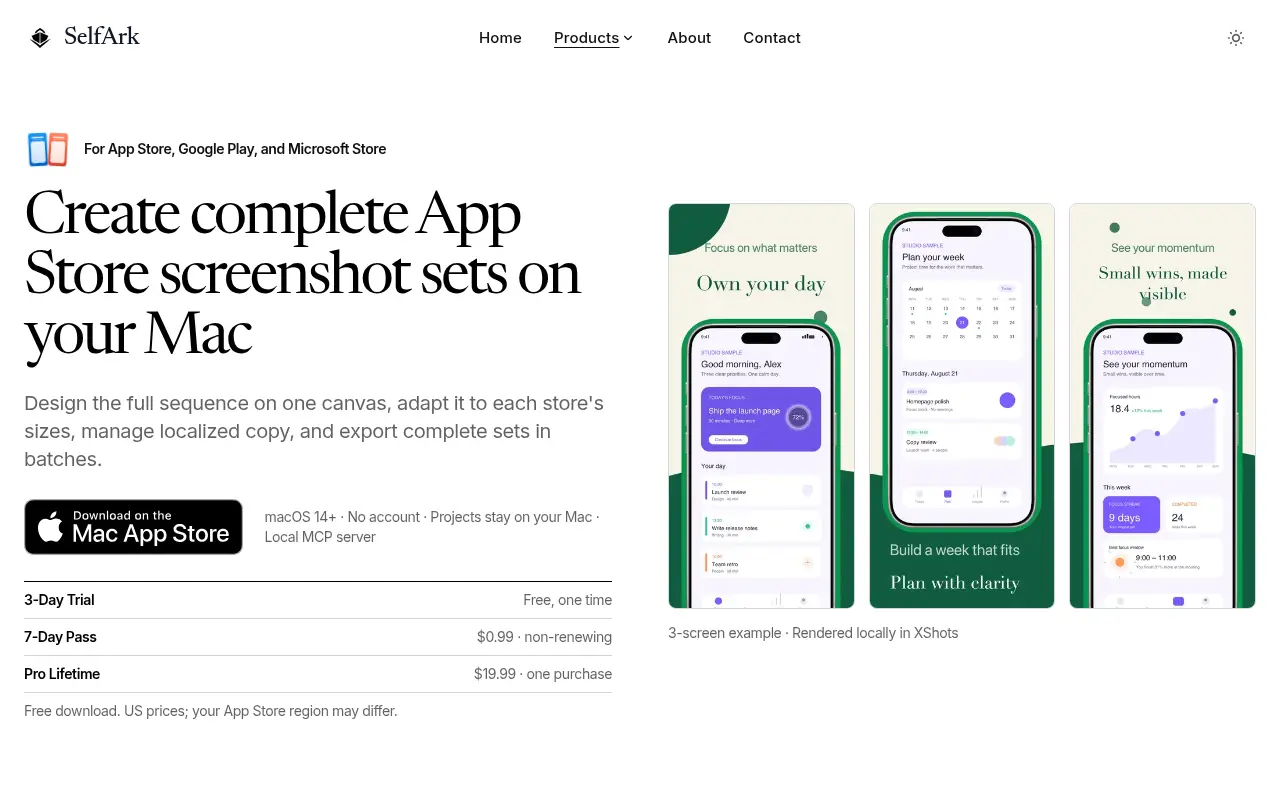
Instead of separate files, you design the full screenshot sequence on one continuous canvas, editing text, images, shapes, backgrounds and device frames in place. Templates carry across phone, tablet and desktop sizes, with presets for iPhone, iPad, Mac, Google Play and Microsoft Store.
Localization is where it saves the most time. Translated copy stays inside the project, you can swap translations in and out through CSV, and automatic translation is available on macOS 15 or later using Apple's system features. Store Preview lets you see the listing as a sequence before export, and a batch export writes every screen, language and size as PNG or JPEG in one go.
There's also a local MCP server built in. A compatible AI client can list templates and device frames and generate screenshots from structured inputs, while XShots itself runs no hosted AI service.
Before you download
XShots is free from the Mac App Store and needs macOS 14 or later. You get a one-time three-day trial, then a non-renewing seven-day pass for $0.99 or Pro Lifetime for $19.99, at US prices. Projects stay readable after a time-limited pass ends, which is a fair touch for a tool you may only need around releases.
The privacy policy, updated August 24, 2026, says projects and source images stay on your Mac, there's no account, and the app has no third-party analytics, advertising or tracking. Purchases go through Apple's StoreKit. If you connect an outside AI client to the MCP server, that client handles your content under its own policy.
The press page lists what's left out: no cloud sync or collaboration, no direct upload to App Store Connect or other stores, and no hosted AI generation. If you're a solo or small-team Mac developer shipping to several stores and languages, it's well worth a look. If you design on Windows, or a whole team needs to edit the same set, it isn't built for you.
Project note details
Dates and editorial links
Published
November 16, 2026
Updated
November 16, 2026
Last checked
Nov 17, 2026
Last checked is the most recent date XShots's own public pages were visited for this note. Seen something that has changed since? Tell us and we'll fix it.
Note history
Publication and substantive update dates for this public note.
- Nov 16, 2026
- Project note published.
Want to come back to XShots?
Save it to this browser. Your Saved list marks projects whose note or updates changed since you last looked.
Keep exploring
More like XShots
- MyBeadPatternCreator Tools · A free browser tool that turns a photo or pixel art into a fuse-bead pattern, using only the bead colors you own.
- CaporaCreator Tools · Capture a screen, add annotations or click-based zooms, adjust the presentation, and export without rebuilding the demo.
- Brush Photo & Video LibraryDeveloper Tools · Study or reuse a small algorithm that places repeated Unicode text along a hand-drawn path and exports the result as SVG.
- Atelier Export — JPEG en plusieurs taillesCreator Tools · A small French-language HTML app for resizing a batch of photos into three JPEG sizes, sold on Gumroad.
- RankHush ToolsUtilities & Calculators · Fourteen free browser tools for images, QR codes, passwords, colors and developer data, with no sign-up and processing on your device.
- Screen Studio KitCreator Tools · A Mac and Windows editor for reusable app-store screenshot layouts and campaign variants.
- EditablePPTSaaS · Converts slide screenshots, images and PDFs into editable .pptx files, on the web and in design and coding tools.
- PinumoBrowser Extensions · A free screenshot tool for Chrome, Edge and Windows that collects captures into a set you can save, combine or export as a PDF.




For the makerAdd the badge to your site
If you made XShots, you can post about this note with a ready-to-edit announcement, or show it on your own site with an optional badge that links back here. Neither changes the note's text or placement. This note's link to the project is marked as user-submitted until the project's site links back, for example with the badge, and is a full backlink while it does.

Want to keep this note's facts current yourself? Project Radar Pro lets a verified maker confirm status, pricing and platforms in a labeled block, post one update a month and see the note's activity totals. It never changes the note's text or placement. See what Pro includes
Building something useful?
Submit your project for free. If selected, it gets a Project Note that explains what it does and links to your work. Publication isn't guaranteed.
Submit a project