Answer me with HTML
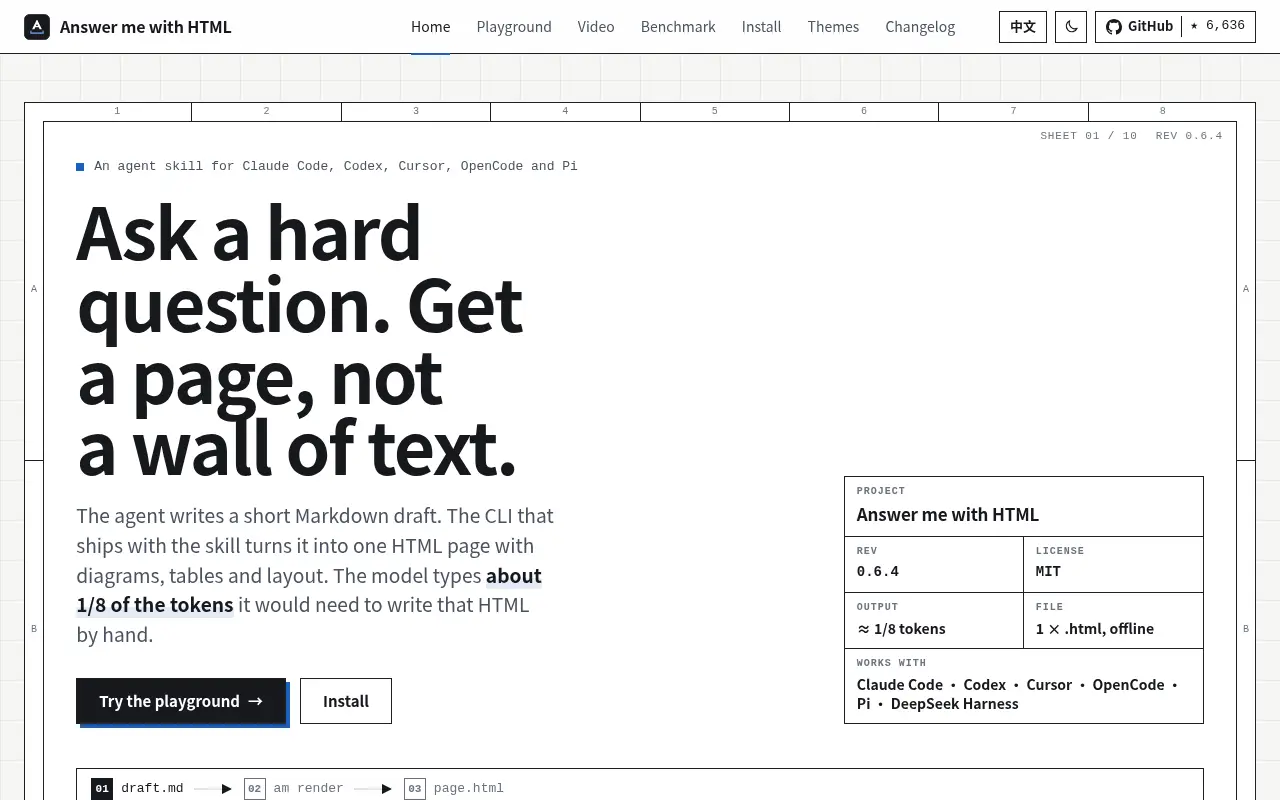
A free, open-source skill that has coding agents answer hard questions as one offline HTML page with diagrams and tables, from a short Markdown draft.
Project links
Visit productRequest correctionProject Note
A closer look at Answer me with HTML
Open-source agent skill and CLI that render a short Markdown draft into one offline HTML page with diagrams, tables and themes. Free, MIT license.
When the answer deserves a diagram
You ask your coding agent how the modules in a repo fit together, and it answers with six paragraphs. The information is all there, but you're the one drawing the picture in your head. Answer me with HTML is a small open-source skill for that situation. With it installed, the agent writes a short Markdown draft, and a renderer that ships inside the skill turns the draft into one HTML page with the diagram, the table and the warning laid out together.
The home page shows the idea with real examples. Asking for the TCP three-way handshake gets a sequence diagram, a state diagram and a flag table. "Redis or Memcached?" becomes a comparison table with ticks and crosses and a verdict. A one-line question still gets a one-line answer, which is a sensible rule for a tool like this.
Less typing for the model
The point of the design is that the model writes content, not markup. Asking a model for raw HTML means it types every CSS rule and SVG coordinate, and output tokens are what you sit and wait for. Here the draft is a few hundred tokens, and the CLI handles layout, theming and diagram geometry in about 50 milliseconds. The project's own benchmark, run on Claude Sonnet 5.5 across three topics, puts it at 612 output tokens against 4,893 for hand-written HTML, about 2.6 times faster, and 15% cheaper per answer. It explains why the bill drops less than the tokens, and these are the maker's measurements, so your setup may differ.
There are components for flows, database diagrams, API calls, folder trees, timelines and inline sentence annotations, plus three themes. Pages open offline with no network requests or web fonts. A newer feature turns a draft into a narrated explainer video page where each line of narration reveals the next step of a diagram. The CLI also checks drafts against a machine-checkable slice of ASD-STE100, a controlled English used in aircraft manuals, and hands the agent a correct example when a line breaks a rule. There's an in-browser playground on the home page if you want to try the renderer before installing anything.
Getting it running
It's free under the MIT license, with optional support through Ko-fi or Afdian. You need Node.js 20 or newer. You can ask your agent to follow the project's install instructions, install it as a plugin, or use the skills installer, which supports more than 70 agents. The CLI makes a daily version check that can be switched off, and the website counts visits and clicks with Umami without cookies. The code lives on GitHub under QingYunA, with support and discussion on Discord.
If you lean on a coding agent to explain unfamiliar code or compare options, this is an easy win for questions where a picture beats a wall of text. If you mostly use a chat interface without skills or a terminal, it has nowhere to plug in yet.
Project note details
Dates and editorial links
Published
November 24, 2026
Updated
November 24, 2026
Last checked
Nov 24, 2026
Last checked is the most recent date Answer me with HTML's own public pages were visited for this note. Seen something that has changed since? Tell us and we'll fix it.
Note history
Publication and substantive update dates for this public note.
- Nov 24, 2026
- Project note published.
Want to come back to Answer me with HTML?
Save it to this browser. Your Saved list marks projects whose note or updates changed since you last looked.
Keep exploring
More like Answer me with HTML
- YourMelodyAI & Skills · Personalized AI song gifts: describe someone, edit the lyrics, hear a free preview, then unlock the full song for $6.99.
- OrbitalDeveloper Tools · A Mac app that runs coding-agent workflows step by step on your own machine, using the Claude Code, Codex or OpenCode account you already have.
- PDF2MDDeveloper Tools · Convert PDFs to Markdown in your browser, with headings and lists detected.
- pdftomdDeveloper Tools · Free in-browser PDF to Markdown conversion with OCR, Markdown tables and JSONL chunks for LLM use, with no upload or sign-up.
- MarkstreamDeveloper Tools · Markstream renders streaming Markdown across Vue, React, Svelte, Angular, Nuxt, and Next.js, with framework-specific setup guidance.
- KiteAI & Skills · A design canvas where people and AI agents work in the same HTML and CSS file, with an MCP server and Figma paste both ways.
- agentskills.codesDeveloper Tools · Browse agent skills by client or category, inspect listings, and copy installation commands for supported coding tools.
- SoldFetchDeveloper Tools · SoldFetch turns eBay sold-listing searches, item pages and category results into one normalized JSON API, with an MCP server and an agent skill for AI tools.





For the makerAdd the badge to your site
If you made Answer me with HTML, you can post about this note with a ready-to-edit announcement, or show it on your own site with an optional badge that links back here. Neither changes the note's text or placement. This note's link to the project is marked as user-submitted until the project's site links back, for example with the badge, and is a full backlink while it does.

Want to keep this note's facts current yourself? Project Radar Pro lets a verified maker confirm status, pricing and platforms in a labeled block, post one update a month and see the note's activity totals. It never changes the note's text or placement. See what Pro includes
Building something useful?
Submit your project for free. If selected, it gets a Project Note that explains what it does and links to your work. Publication isn't guaranteed.
Submit a project