PDF2MD
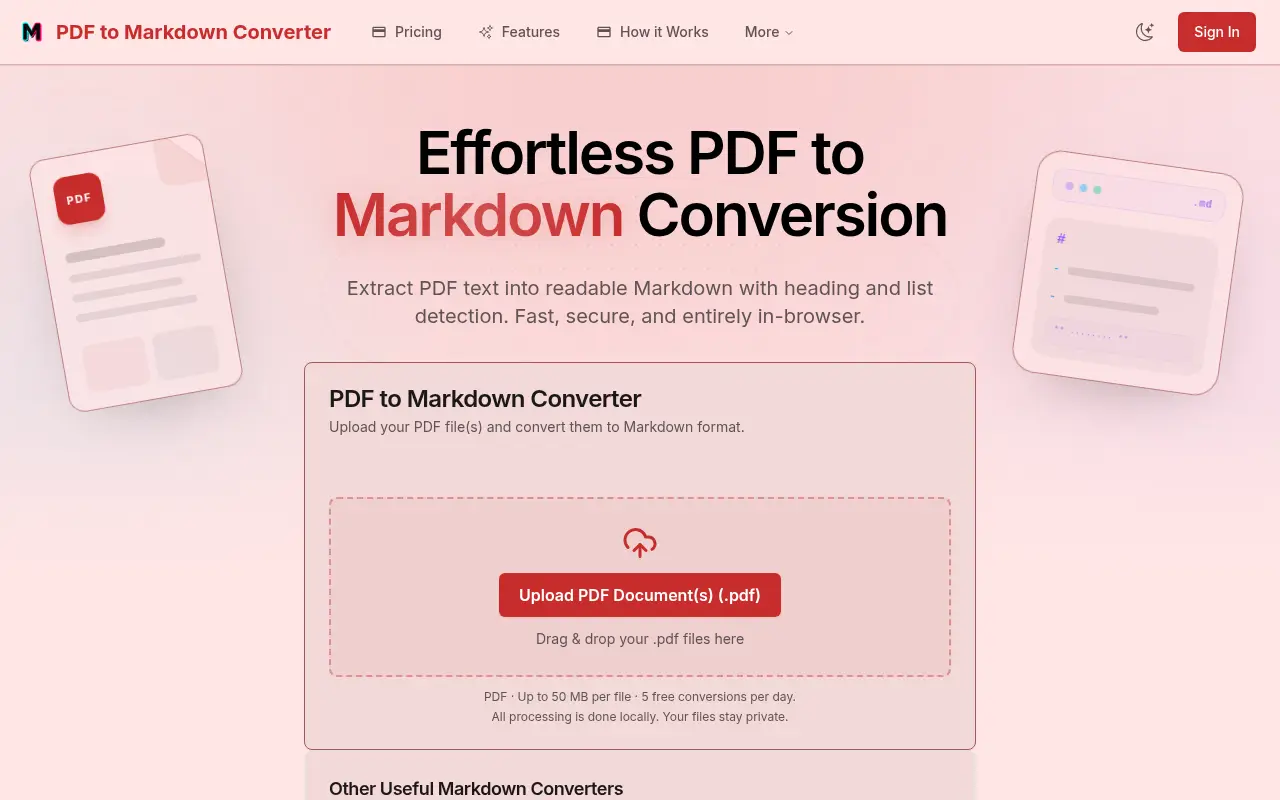
A browser-based PDF to Markdown converter that keeps standard conversions on your machine, with an optional OCR mode for scanned files. Five free conversions a day.
Project links
Visit productRequest correctionProject Note
A closer look at PDF2MD
Convert PDFs to Markdown in your browser, with headings and lists detected. Five free conversions a day; optional OCR for scans.
Getting a PDF into something you can work with
PDFs are built for reading, not for reuse. If you want to feed API documentation into an AI coding tool or pull a paper into your notes, you need plain text with the structure intact. PDF2MD converts PDFs to Markdown right in your browser, picking up headings and lists so the result reads like a document rather than a wall of text.
Its maker, an indie developer who signs the about page as Ben, explains the origin plainly: "I built PDF2MD because I needed it for my own work", turning API docs into Markdown to feed Claude Code and research material into searchable notes. The about page says the tool gets used several times a day, and that shows in the small, practical touches.
Local conversion, optional OCR
The standard converter runs inside your browser. According to the privacy policy, it doesn't upload your PDFs, so it's the mode to use for anything sensitive with selectable text. You can drop in up to 100 files at once, each up to 50 MB, preview the Markdown and download each result.
Scanned PDFs and images need OCR, and that's a separate mode you choose deliberately. When you use it, the file goes to a server-side OCR provider, which the policy doesn't name or give a retention period for. It does say files aren't used to train models by PDF2MD. That split is worth knowing before you run a confidential scan through it.
Free allowance and paid plans
The free tier includes five browser conversions a day and, once you sign in, one OCR conversion a day. Paid plans add more OCR, batch ZIP downloads and an ad-free experience: Pro is $6.93 a month billed yearly with 50 OCR conversions a day, Pro+ is $20.93 a month with 200, and Ultimate is $69.30 a month with unlimited OCR. They renew automatically, and monthly and credit-pack options exist too. The free tier shows ads.
PDF2MD sits in a small family of converters from the same maker, including word2md.net and pdftomarkdown.net, and its source lives on GitHub under littleben.
If you regularly turn text-based PDFs into Markdown for docs, notes or prompts, the free daily allowance may be all you need. If most of your files are scanned and confidential, the unnamed OCR provider is a reason to think twice.
For reference
Project facts
The published details and source context, together in one place.
- Stage
- Launched
Project note details
Dates and editorial links
Published
November 23, 2026
Updated
November 23, 2026
Last checked
Nov 24, 2026
Last checked is the most recent date PDF2MD's own public pages were visited for this note. Seen something that has changed since? Tell us and we'll fix it.
Note history
Publication and substantive update dates for this public note.
- Nov 23, 2026
- Project note published.
Want to come back to PDF2MD?
Save it to this browser. Your Saved list marks projects whose note or updates changed since you last looked.
Keep exploring
More like PDF2MD
- openpurrDeveloper Tools · An Apache 2.0, self-hosted backend for App Store and Google Play subscriptions that works with the official Purchases SDK through its proxy URL.
- pdftomdDeveloper Tools · Free in-browser PDF to Markdown conversion with OCR, Markdown tables and JSONL chunks for LLM use, with no upload or sign-up.
- PDF FanUtilities & Calculators · Extract, split, merge, compress and OCR PDFs for free, mostly in your browser.
- Answer me with HTMLAI & Skills · Open-source agent skill and CLI that render a short Markdown draft into one offline HTML page with diagrams, tables and themes.
- PDF Annotation RemoverSaaS · Remove PDF highlights, sticky notes and markup locally in your browser.
- MarkovoWebsites · Converts PDFs and other files to text, Word or Markdown on its servers. Free plan with 25 credits a month; paid plans from $3.99.
- EditablePPTSaaS · Converts slide screenshots, images and PDFs into editable .pptx files, on the web and in design and coding tools.
- PDF to AudiobookSaaS · Convert English text PDFs into chapter MP3s with preset AI voices.


For the makerAdd the badge to your site
If you made PDF2MD, you can post about this note with a ready-to-edit announcement, or show it on your own site with an optional badge that links back here. Neither changes the note's text or placement. This note's link to the project is marked as user-submitted until the project's site links back, for example with the badge, and is a full backlink while it does.

Want to keep this note's facts current yourself? Project Radar Pro lets a verified maker confirm status, pricing and platforms in a labeled block, post one update a month and see the note's activity totals. It never changes the note's text or placement. See what Pro includes
Building something useful?
Submit your project for free. If selected, it gets a Project Note that explains what it does and links to your work. Publication isn't guaranteed.
Submit a project