pdftomd
A free PDF to Markdown converter with OCR, tables and LLM-ready chunks that runs in your browser tab.
Project links
Visit productRequest correctionProject Note
A closer look at pdftomd
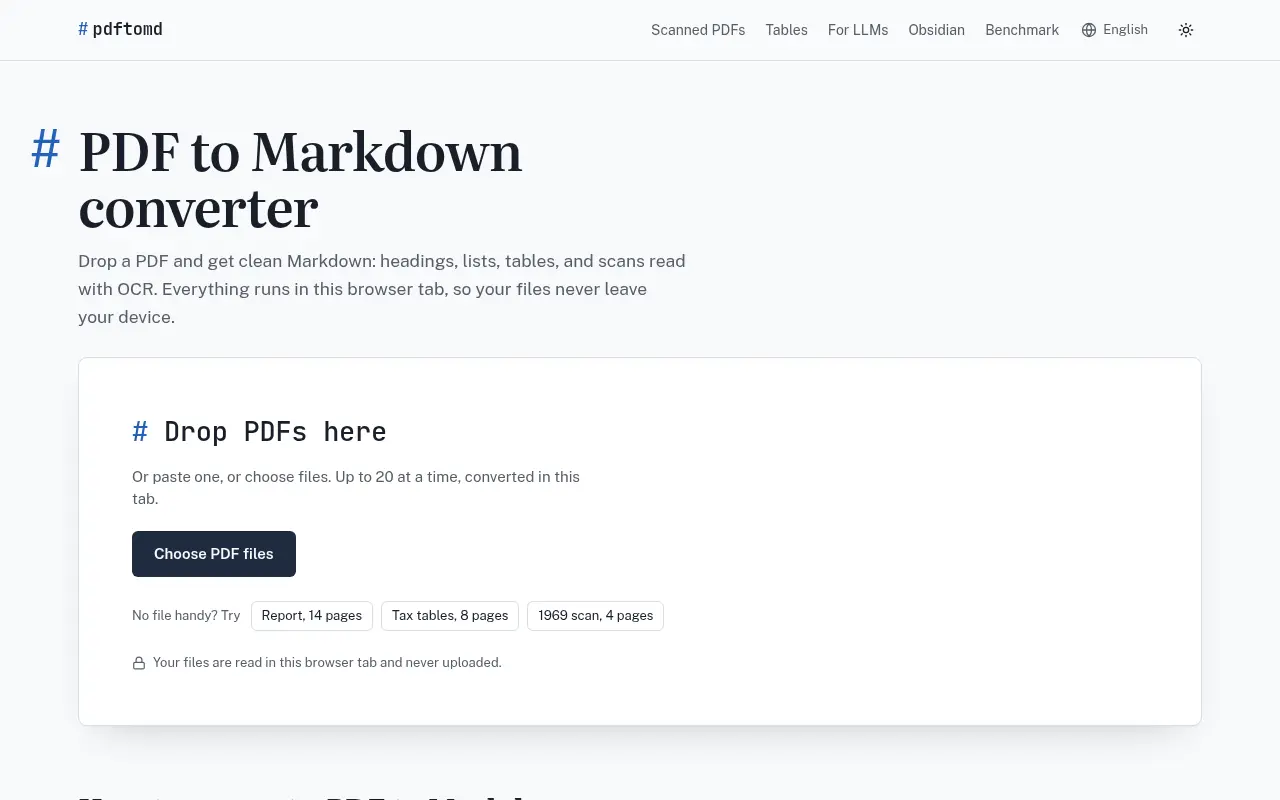
Free in-browser PDF to Markdown conversion with OCR, Markdown tables and JSONL chunks for LLM use, with no upload or sign-up.
Getting text out of a PDF without handing it over
PDFs are where text goes to get stuck. You want a contract, a paper or a scanned manual inside your notes app or a chat with a language model, and copy-paste gives you broken lines, lost tables and page numbers in the middle of sentences. Most online converters fix that by asking you to upload the file first, which is an awkward ask when the PDF is a lease or a medical letter.
pdftomd takes a different route. The converter runs inside your browser tab, so the file is read and converted on your own device. Drop in a PDF, or up to 20 at once, and you get Markdown back with headings, numbered and bulleted lists, links with their addresses and tables rebuilt as Markdown tables.
Built for checking, not just converting
The nicest touch is the Pages to check list. Conversions tend to go wrong in the same places, multi-column layouts and tables where the reading order gets scrambled, and pdftomd flags those pages and shows a picture of each one beside its Markdown so you can compare them quickly. Scanned pages go through OCR on your device, which takes longer than a text PDF but still never leaves the tab. The site says the OCR model is a download of several megabytes the first time you use it.
If the Markdown is headed for a language model, there's more to like. The converter counts tokens on exactly what you'll copy, and a set of Trim for LLMs switches shows what you'd save by dropping link addresses or formatting. It can also split the document into chunks under a size you set, keeping each chunk's heading path and page numbers, and download them as JSONL for a RAG pipeline. For plain use you can take a single .md file, or a ZIP with the images saved beside it.
Worth knowing before you convert
It's free, with no sign-up, no watermark and no daily cap, and it works in current mobile browsers, though long scans are slower on a phone. According to its privacy policy, last updated November 13, 2026, your PDFs never leave your device and the site is hosted on Cloudflare, which sees ordinary request details like your IP address. The policy says the site may count visits with an analytics service and will ask for consent before using one that sets cookies. It doesn't name a service, though the page source references Google Tag Manager and Plausible. The site names no person or company behind it beyond a contact email, which matters less when nothing you convert is sent to it.
The footer notes that MarkItDown is Microsoft's open-source project and that pdftomd isn't affiliated with Microsoft, Obsidian or other tools it mentions. If you regularly turn PDFs into notes or model input and don't want those files on someone else's server, this is worth a bookmark. If you need a hosted API to convert documents from your own code, that's not what it offers.
Project note details
Dates and editorial links
Published
November 18, 2026
Updated
November 18, 2026
Last checked
Nov 18, 2026
Last checked is the most recent date pdftomd's own public pages were visited for this note. Seen something that has changed since? Tell us and we'll fix it.
Note history
Publication and substantive update dates for this public note.
- Nov 18, 2026
- Project note published.
Want to come back to pdftomd?
Save it to this browser. Your Saved list marks projects whose note or updates changed since you last looked.
Keep exploring
More like pdftomd
- DatacircleDeveloper Tools · A benchmark and price comparison of go-to-market data APIs, free to download or query.
- MarkovoWebsites · Converts PDFs and other files to text, Word or Markdown on its servers. Free plan with 25 credits a month; paid plans from $3.99.
- PDF FanUtilities & Calculators · Extract, split, merge, compress and OCR PDFs for free, mostly in your browser.
- PDF Annotation RemoverSaaS · Remove PDF highlights, sticky notes and markup locally in your browser.
- LensUp ScannerUtilities & Calculators · Free on-device document tools for scanning to PDF, passport photos, ID card copies, compression to a target size and Markdown conversion.
- NoFileUploadUtilities & Calculators · Free in-browser tools for file metadata, image conversion and PDFs, with no uploads.
- jsonl.coDeveloper Tools · jsonl.co is a free in-browser JSONL viewer and editor for files up to 1 GB, with validation, converters and no uploads.
- Answer me with HTMLAI & Skills · Open-source agent skill and CLI that render a short Markdown draft into one offline HTML page with diagrams, tables and themes.



For the makerAdd the badge to your site
If you made pdftomd, you can post about this note with a ready-to-edit announcement, or show it on your own site with an optional badge that links back here. Neither changes the note's text or placement. This note's link to the project is marked as user-submitted until the project's site links back, for example with the badge, and is a full backlink while it does.

Want to keep this note's facts current yourself? Project Radar Pro lets a verified maker confirm status, pricing and platforms in a labeled block, post one update a month and see the note's activity totals. It never changes the note's text or placement. See what Pro includes
Building something useful?
Submit your project for free. If selected, it gets a Project Note that explains what it does and links to your work. Publication isn't guaranteed.
Submit a project