
CrateBack
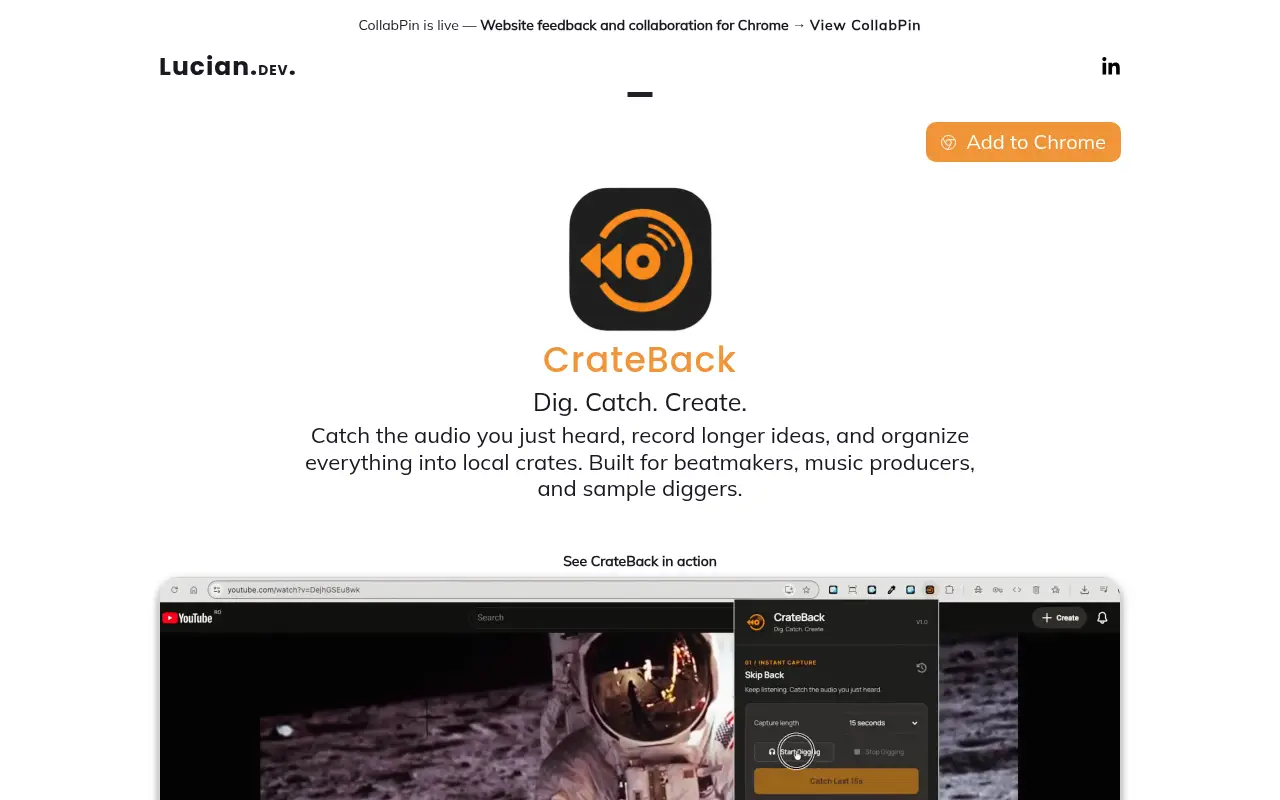
A Chrome extension for sample diggers that saves the last 15 to 30 seconds of tab audio after you've already heard the good part.
Project links
Visit productRequest correctionProject Note
A closer look at CrateBack
Chrome extension that catches recent tab audio and files it into local crates for producers.
When the good part has already played
You're digging through old records or videos in a browser tab, half listening, and then a four-bar horn line goes by. By the time you hit record, it's gone, and now you're scrubbing back trying to find it. CrateBack is built around that exact moment.
It comes from Lucian, an independent web developer who also makes the CollabPin feedback extension. CrateBack is aimed squarely at beatmakers, producers and sample diggers, and it treats capture and organizing as one job.
Catch first, sort later
Start a Digging session and keep listening as normal. CrateBack holds a Skip Back window of 15, 20, 25 or 30 seconds, and when you hear something worth keeping, Catch Last saves the audio that already played. You can keep the session going and catch as many moments as you like. For longer passages, a regular recording runs up to 30 minutes with a live waveform.
Everything lands in Crates, a local library you can split into your own collections. You can mark each capture Used or Unused so you know which samples already made it into a track, trim and loop a range without touching the original WAV, and normalize the export to about -1 dBFS. Download the result as a WAV or try dragging it straight into a compatible DAW. Search covers titles, sources and URLs, which helps when you want to get back to where a sound came from.
Before you install it
CrateBack runs in desktop Chrome. The free version includes Skip Back, recording, crates, trimming, normalization and individual WAV export, with no account needed. Pro is a one-time license, normally $39 and $29 at launch, that adds tags, local BPM and key detection with manual correction, filtering by tempo or key, and bulk ZIP export. One license covers one active Chrome installation at a time, and it's sold through Gumroad.
According to its privacy policy, updated November 4, 2026, captures and library details stay in your browser and aren't uploaded to a cloud library. The extension does store each capture's source page title and URL locally, and Pro licensing talks to the developer's server, which uses an installation ID and doesn't keep your raw license key after activation. The FAQ says CrateBack isn't a media downloader, doesn't bypass DRM, and doesn't give you sample-clearance rights, so what you do with a catch is your responsibility.
If you dig for samples in Chrome and keep losing the moment, the free tier is worth installing today. If you work on a phone or in another browser, or you need cleared samples rather than raw captures, this one isn't for you.
Project note details
Dates and editorial links
Published
November 17, 2026
Updated
November 17, 2026
Last checked
Nov 17, 2026
Last checked is the most recent date CrateBack's own public pages were visited for this note. Seen something that has changed since? Tell us and we'll fix it.
Note history
Publication and substantive update dates for this public note.
- Nov 17, 2026
- Project note published.
Want to come back to CrateBack?
Save it to this browser. Your Saved list marks projects whose note or updates changed since you last looked.
Keep exploring
More like CrateBack
- CollabPinBrowser Extensions · Pin feedback to elements on a live website in Chrome.
- recorder.videoCreator Tools · Record your screen, a tab, your webcam and your voice together or separately, trim the take and export MP4, WebM, audio or a GIF, all in the browser.
- sync.videoCreator Tools · A free browser tool that finds and fixes audio delay, syncs separate recordings by their sound and saves a new file with the picture untouched.
- AudioMIDICreator Tools · AudioMIDI is a free browser tool that converts MP3, WAV and other audio files into editable MIDI.
- AudioDingCreator Tools · A free set of in-browser audio tools for trimming, converting, tuning and transcribing, where files stay on your device instead of being uploaded.
- Open Music PlayerApps · A local audio player for iPhone and iPad built around files and folders the listener selects.
- PiSpace ToolsUtilities & Calculators · 74 free browser tools for images, PDFs, video, audio and text that process files on your device, with no uploads, account or ads.
- AudioEditDeskCreator Tools · AudioEditDesk is a free browser audio editor for trimming, converting and adjusting one file at a time, with processing done on your own device.





For the makerAdd the badge to your site
If you made CrateBack, you can post about this note with a ready-to-edit announcement, or show it on your own site with an optional badge that links back here. Neither changes the note's text or placement. This note's link to the project is marked as user-submitted until the project's site links back, for example with the badge, and is a full backlink while it does.

Want to keep this note's facts current yourself? Project Radar Pro lets a verified maker confirm status, pricing and platforms in a labeled block, post one update a month and see the note's activity totals. It never changes the note's text or placement. See what Pro includes
Building something useful?
Submit your project for free. If selected, it gets a Project Note that explains what it does and links to your work. Publication isn't guaranteed.
Submit a project