Nightcap
A free, open-source sleep timer for Mac, Windows and Linux that dims the screen, lowers the volume and then puts your computer to sleep.
Project links
Visit productRequest correctionProject Note
A closer look at Nightcap
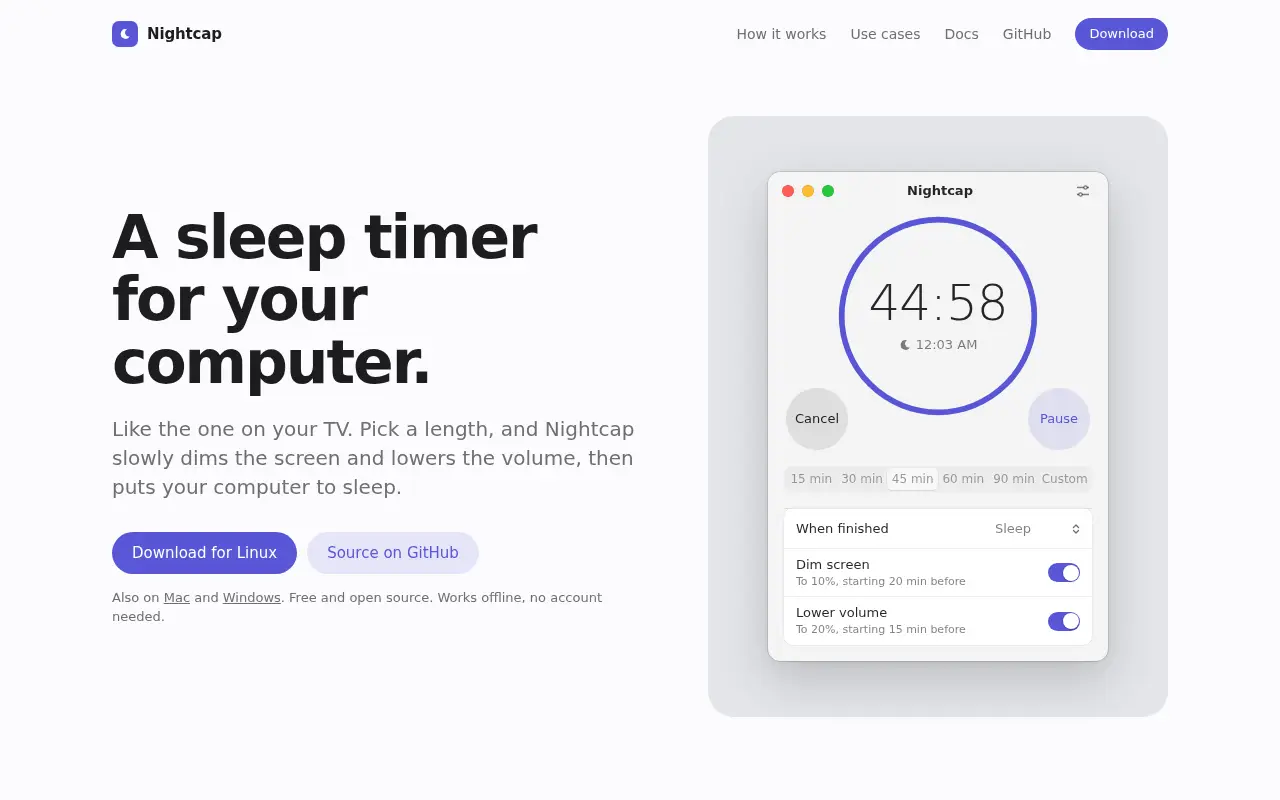
A sleep timer for your computer, like the one on a TV, that works offline with no account.
Falling asleep to one more episode
You put on one more episode in bed, the laptop balanced on the duvet, and wake at 3am to a bright screen and an autoplay queue that never stopped. TVs solved this long ago with a sleep timer. Nightcap, a small open-source app by Ryan Kegerreis, brings the same idea to your computer.
You pick a length, from 15 to 90 minutes or a custom time, and press Start. As the end approaches, the screen fades to a brightness you choose and the volume eases down on its own schedule, so the show trails off instead of cutting out. When the timer ends, the computer sleeps, hibernates or shuts down, whichever you picked, and Nightcap remembers that choice next time.
The small touches
Most nights you won't even open the window. Nightcap sits in the Mac menu bar, or the system tray on Windows and Linux, where you can start a 15, 30, 45, 60 or 90 minute timer, pause it, add 15 minutes or cancel. Closing the window leaves the timer running.
Screens that don't support brightness control get a dimming overlay instead. And when you cancel the timer or wake the computer, brightness and volume go back to where they were. That last part matters more than it sounds, because nobody wants to start the morning with a dim screen and quiet speakers and no idea why.
Before you install
Nightcap is free, licensed under MIT or Apache 2.0, and the source is on GitHub. It needs no account, works offline and keeps its settings on your computer. It runs on Apple silicon and Intel Macs, Windows 10 or later, and Linux. The latest release on GitHub is version 0.1.1 from October, so it's a young project.
Expect a warning the first time you open it. The app isn't registered with Apple's paid developer program or signed with a Windows certificate, so macOS says it can't check it for malicious software and Windows shows "Windows protected your PC". The docs walk you through opening it anyway, through Privacy & Security on a Mac or "More info" and "Run anyway" on Windows. On Linux, the tray icon needs a desktop with tray support, which on GNOME means installing an AppIndicator extension.
If you fall asleep to shows on your laptop and want the night to end gently, it's a free and tidy fix. If you'd rather not click past a security warning to install unsigned software, this one isn't for you.
Project note details
Dates and editorial links
Published
November 16, 2026
Updated
November 16, 2026
Last checked
Nov 16, 2026
Last checked is the most recent date Nightcap's own public pages were visited for this note. Seen something that has changed since? Tell us and we'll fix it.
Note history
Publication and substantive update dates for this public note.
- Nov 16, 2026
- Project note published.
Want to come back to Nightcap?
Save it to this browser. Your Saved list marks projects whose note or updates changed since you last looked.
Keep exploring
More like Nightcap
- CopyPlaintextUtilities & Calculators · Free paste-as-plain-text tool with line and spacing cleanup, batch .txt cleanup and a speech timer, processed in your browser.
- Sleep CalculatorHealth & Wellbeing · Sleep Calculator is a free bedtime and wake-up planner that uses a sleep duration or cycle estimate plus time to fall asleep.
- ScreenAwakeUtilities & Calculators · ScreenAwake keeps your screen on from a browser tab.
- Mouse Jiggler for MacUtilities & Calculators · A Mac menu-bar app that moves the pointer on a schedule to keep your Mac awake, with stop times, app conditions and a low-battery cutoff.
- StimPad: Stimming SoundboardHealth & Wellbeing · A soundboard of 95 looping sensory sounds for iPhone and iPad, with a sleep timer and a one-time Plus unlock.
- ConfileoUtilities & Calculators · Free online toolbox of 101 PDF, OCR, image and document tools with strong Arabic and right-to-left support.
- EatWiseUtilities & Calculators · Free fast food nutrition calculators for 10 US chains, totaling calories, macros, sodium and caffeine for a customized order.
- IDPhotoDockUtilities & Calculators · Free in-browser passport photo cropper with printable sheets, plus an optional US$4.99 white-background portrait service for general use.



For the makerAdd the badge to your site
If you made Nightcap, you can post about this note with a ready-to-edit announcement, or show it on your own site with an optional badge that links back here. Neither changes the note's text or placement. This note's link to the project is marked as user-submitted until the project's site links back, for example with the badge, and is a full backlink while it does.

Want to keep this note's facts current yourself? Project Radar Pro lets a verified maker confirm status, pricing and platforms in a labeled block, post one update a month and see the note's activity totals. It never changes the note's text or placement. See what Pro includes
Building something useful?
Submit your project for free. If selected, it gets a Project Note that explains what it does and links to your work. Publication isn't guaranteed.
Submit a project