
Mouse Jiggler for Mac
A Mac menu-bar app that moves the pointer on a schedule to keep your Mac awake, with stop times, app conditions and a low-battery cutoff.
Project links
Visit productRequest correctionProject Note
A closer look at Mouse Jiggler for Mac
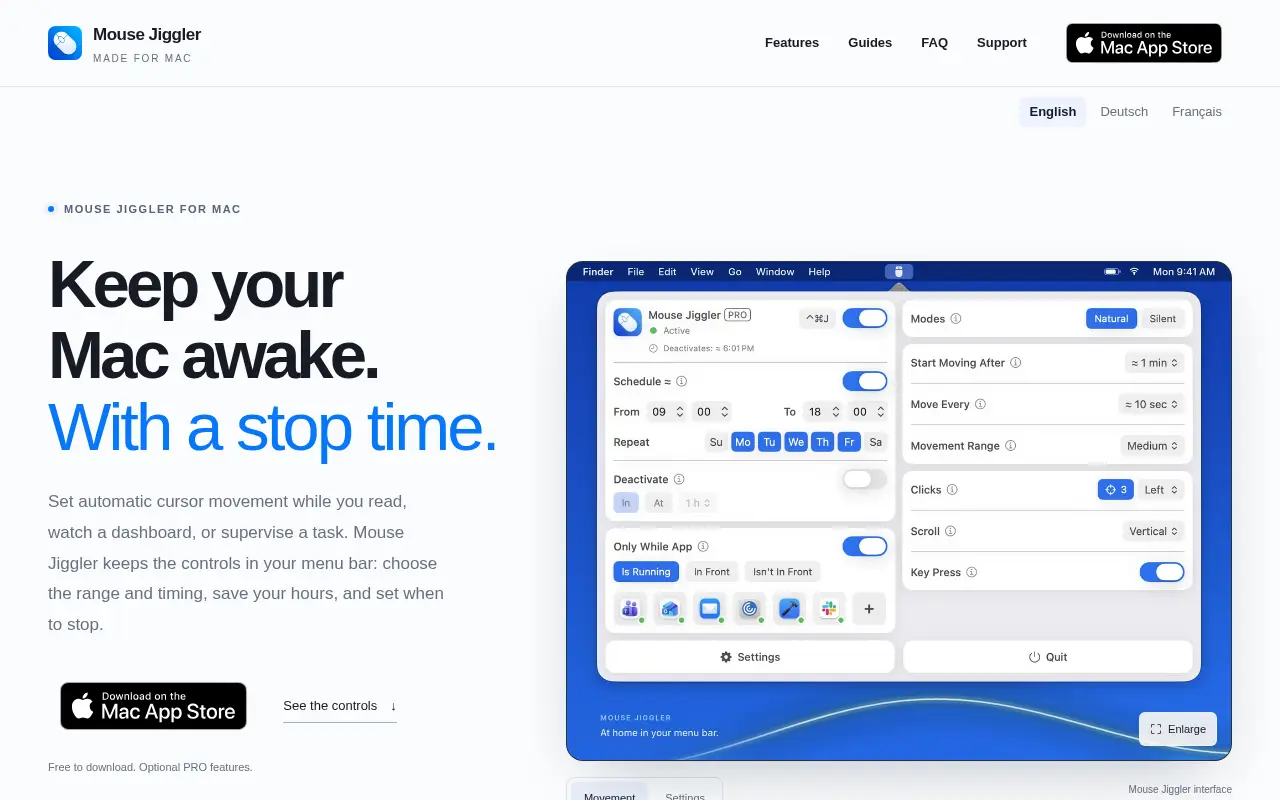
Mouse Jiggler is a free Mac menu-bar app that moves the cursor automatically after a delay you choose, so your Mac stays awake while you read, watch a dashboard or wait on an export. You set the movement, save weekday hours and choose when it stops. Some controls need the paid PRO upgrade.
When the Mac sleeps on you
You're reading a long reference while taking notes on paper, or watching a dashboard during a call, or waiting for an export to finish, and the Mac dims, locks or goes to sleep. The built-in settings can change that, but they're all or nothing, and it's easy to forget to switch them back.
Mouse Jiggler takes a gentler route from the menu bar. After an idle delay you choose, it moves the pointer a little, either in a Natural pattern or a Silent one, with a range and interval you can adjust. It watches for your own mouse and keyboard activity and holds off while you're using the Mac, so it doesn't fight you while you work.
A schedule and an off switch
The part that sets it apart from a bare jiggler is control over when it runs. You can save weekday hours, say 09:00 to 18:00 Monday to Friday, and give a session an end, either at a set time or after a duration. It can also run only when chosen apps are open or in front, and switch itself off when the battery runs low. A separate switch keeps the Mac from sleeping while it's active, and you can set a keyboard shortcut. Some of these controls need the PRO upgrade.
The site is refreshingly plain about limits. It says not to rely on it to keep a closed MacBook awake, and that it can't guarantee a particular status in apps such as Teams or Zoom, since those follow their own rules. Its guides also cover macOS's built-in caffeinate command and other ways to keep a Mac awake, if a menu-bar app is more than you need.
Before you install
The app is free on the Mac App Store, and the PRO features are priced in the app rather than on the site. Setup asks for macOS input permission, called Accessibility on macOS 13 to 26, which you can revoke in System Settings. According to its privacy policy, effective February 1, 2025, the app collects no personal data, analytics or identifiers, keeps its settings on your Mac, and watches keyboard activity only to pause movement, without recording what you type. The website itself does load Google Analytics, which that app policy doesn't cover. It's developed by Bohdan Bilous as part of macapp.studio, and the site says AI tools help draft its guides.
If your Mac keeps sleeping at the wrong moment, this gives you finer control than the system settings. If you're on Windows or need a closed laptop kept awake, it isn't the tool for that.
Project note details
Dates and editorial links
Published
November 21, 2026
Updated
November 21, 2026
Last checked
Nov 21, 2026
Last checked is the most recent date Mouse Jiggler for Mac's own public pages were visited for this note. Seen something that has changed since? Tell us and we'll fix it.
Note history
Publication and substantive update dates for this public note.
- Nov 21, 2026
- Project note published.
Want to come back to Mouse Jiggler for Mac?
Save it to this browser. Your Saved list marks projects whose note or updates changed since you last looked.
Keep exploring
More like Mouse Jiggler for Mac
- ScreenAwakeUtilities & Calculators · ScreenAwake keeps your screen on from a browser tab.
- Mac NinjaApps · Mac Ninja is a native macOS utility that sleeps idle Chrome tabs and calms background apps to free memory and CPU, without closing your tabs or apps.
- DeskBlurApps · A Mac menu-bar app that blurs and dims background windows so the one you're working in stands out.
- NightcapUtilities & Calculators · A sleep timer for your computer, like the one on a TV, that works offline with no account.
- NaplessApps · A Mac menu-bar keep-awake app with timers, advertised activity watches and a visible reason for each hold.
- SumivoUtilities & Calculators · 48 free calculators for batteries, circuits, OEE, takt time, fractions and more, each with its method and test runs shown.
- HARNESSApps · HARNESS lets you choose a place and a schedule for an activity, checks the place when you start its timer, and records the time spent.
- ConfileoUtilities & Calculators · Free online toolbox of 101 PDF, OCR, image and document tools with strong Arabic and right-to-left support.






For the makerAdd the badge to your site
If you made Mouse Jiggler for Mac, you can post about this note with a ready-to-edit announcement, or show it on your own site with an optional badge that links back here. Neither changes the note's text or placement. This note's link to the project is marked as user-submitted until the project's site links back, for example with the badge, and is a full backlink while it does.

Want to keep this note's facts current yourself? Project Radar Pro lets a verified maker confirm status, pricing and platforms in a labeled block, post one update a month and see the note's activity totals. It never changes the note's text or placement. See what Pro includes
Building something useful?
Submit your project for free. If selected, it gets a Project Note that explains what it does and links to your work. Publication isn't guaranteed.
Submit a project