PanelOS
Software for the little 3.5-inch screen in your PC case, with a free Lite version and a one-time $6.99 Pro.
 P
Project links
Visit productRequest correctionProject Note
A closer look at PanelOS
A Windows app that puts live PC stats, a clock, weather and now-playing info on a 3.5-inch USB case screen.
The little screen in the case
Small USB screens for PC cases are a fun buy. A 3.5-inch panel sits behind the glass, ready to show how hot your CPU is running. What it ends up showing depends entirely on the software feeding it.
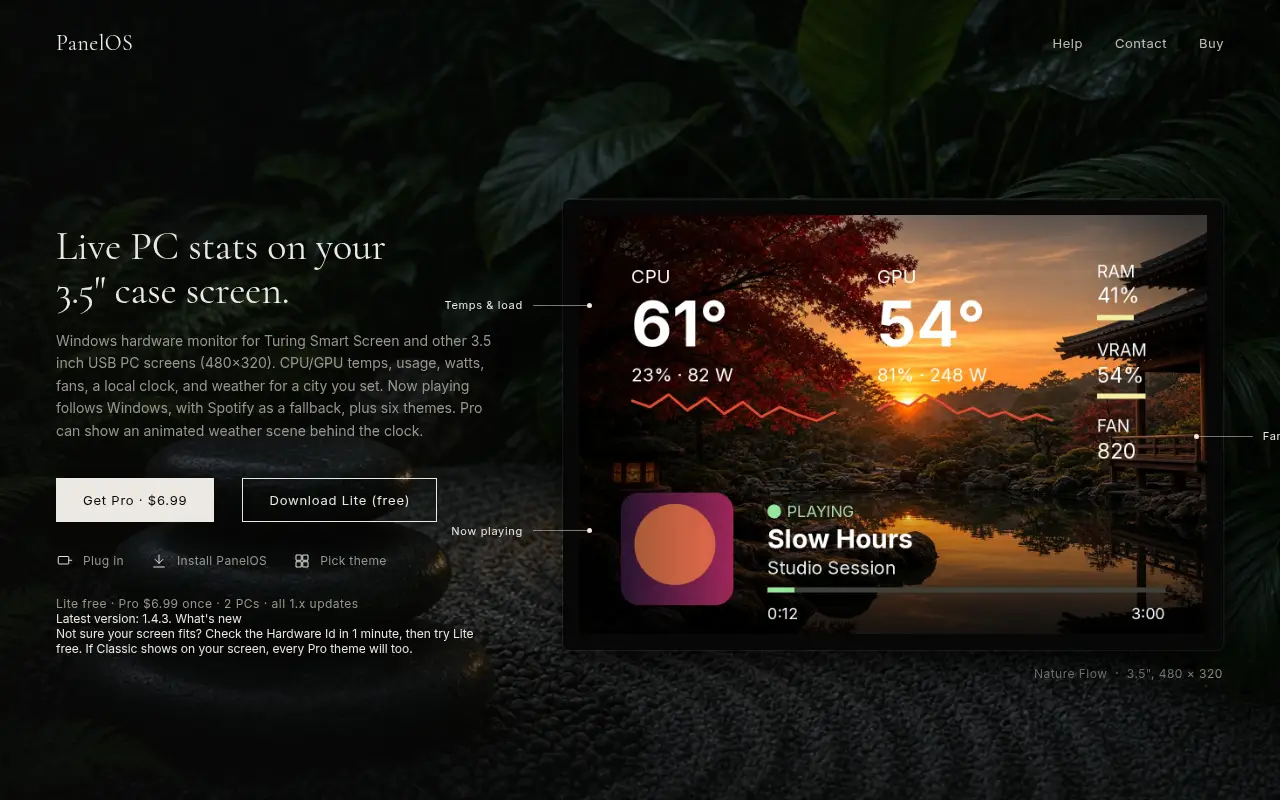
PanelOS is a Windows app written for these panels, the Turing Smart Screen and other 3.5-inch USB screens at 480 by 320. The setup it describes is three steps. Plug in the screen, install PanelOS, pick a theme. After that it lives in the system tray, and the screen follows whatever you choose there.
It comes from a solo developer, and that shows in a good way. The help pages answer the questions a builder would really ask, like why the CPU temperature reads zero. The app needs admin rights, set once by the installer, and some PCs also need a sensor driver.
What goes on the panel
The basics are CPU and GPU temperatures, usage, watts and fan speeds. Around those you get a local clock and weather for a city you set. Now playing follows whatever Windows reports as the current song, with Spotify as a fallback, and there's no Spotify login involved.
There are six themes, with names like Signature, Nature Flow, Noir Editorial and Chronograph. Pro can also put an animated weather scene behind the clock. The screen goes dark when Windows shuts down or sleeps and comes back on wake, which is a nice touch for a PC that sits in a bedroom.
Not sure your panel is supported? The site suggests checking its hardware ID and then trying Lite. If the Classic theme shows up on your screen, every Pro theme will too.
Lite, Pro and one Windows warning
Lite is free. Pro costs $6.99 once, covers two PCs and includes all 1.x updates. The latest version listed in November 2026 is 1.4.3.
Expect a warning when you install. The installer isn't code-signed yet, so Windows SmartScreen may flag it. The developer's explanation is plain: "Signing certificates are expensive for a solo developer." Each release is submitted to Microsoft for review, and the SHA-256 hash of every installer is published in the release notes, so you can check that your download matches. Only download it from the official site.
Two more things to know. The site has no privacy policy, though the app needs no account and the contact form is the only place that asks for a name and email. And PanelOS states it isn't affiliated with any hardware manufacturer.
If there's a small screen in your case doing less than it could, the free Lite download is a low-risk way to see what PanelOS makes of it.
Project note details
Dates and editorial links
Published
November 12, 2026
Updated
November 12, 2026
Note history
Publication and substantive update dates for this public note.
- Nov 12, 2026
- Project note published.
Want to come back to PanelOS?
Save it to this browser. Your Saved list marks projects whose note or updates changed since you last looked.
Keep exploring
More like PanelOS
- MortmeterUtilities & Calculators · A free site that prices any activity by the odds it kills you, then turns that into time off your life at your age.
- Pocket ScreenApps · A Mac app designed to show a separate live view of another app in a floating window.
- Chrono MockDeveloper Tools · A Windows testing tool designed to substitute an application clock without changing the system clock.
- Concrete CalculatorUtilities & Calculators · A free concrete estimator that turns your measurements into cubic yards, a bag count and an optional material cost, with no account.
- WatchToTextUtilities & Calculators · A free tool that turns a public YouTube link into a transcript you can copy or download as TXT, SRT or VTT.
- HouseRulerUtilities & Calculators · HouseRuler is a free 7th house ruler calculator for people learning relationship astrology, with written interpretations for each house placement and a paid personalised report.
- LizelyUtilities & Calculators · Lizely is a free collection of browser tools for PDFs, images, text and code.
- PDF SealBoxUtilities & Calculators · A small set of browser PDF tools built around stamping.



For the makerAdd the badge to your site
If you made PanelOS, you can post about this note with a ready-to-edit announcement, or show it on your own site with an optional badge that links back here. Neither changes the note's text or placement. This note's link to the project is marked as user-submitted until the project's site links back, for example with the badge, and is a standard link while it does.

Want to keep this note's facts current yourself? Project Radar Pro lets a verified maker confirm status, pricing and platforms in a labeled block, post one update a month and see the note's activity totals. It never changes the note's text or placement. See what Pro includes
Building something useful?
Submit your project for free. If selected, it gets a Project Note that explains what it does and links to your work. Publication isn't guaranteed.
Submit a project