PDF SealBox
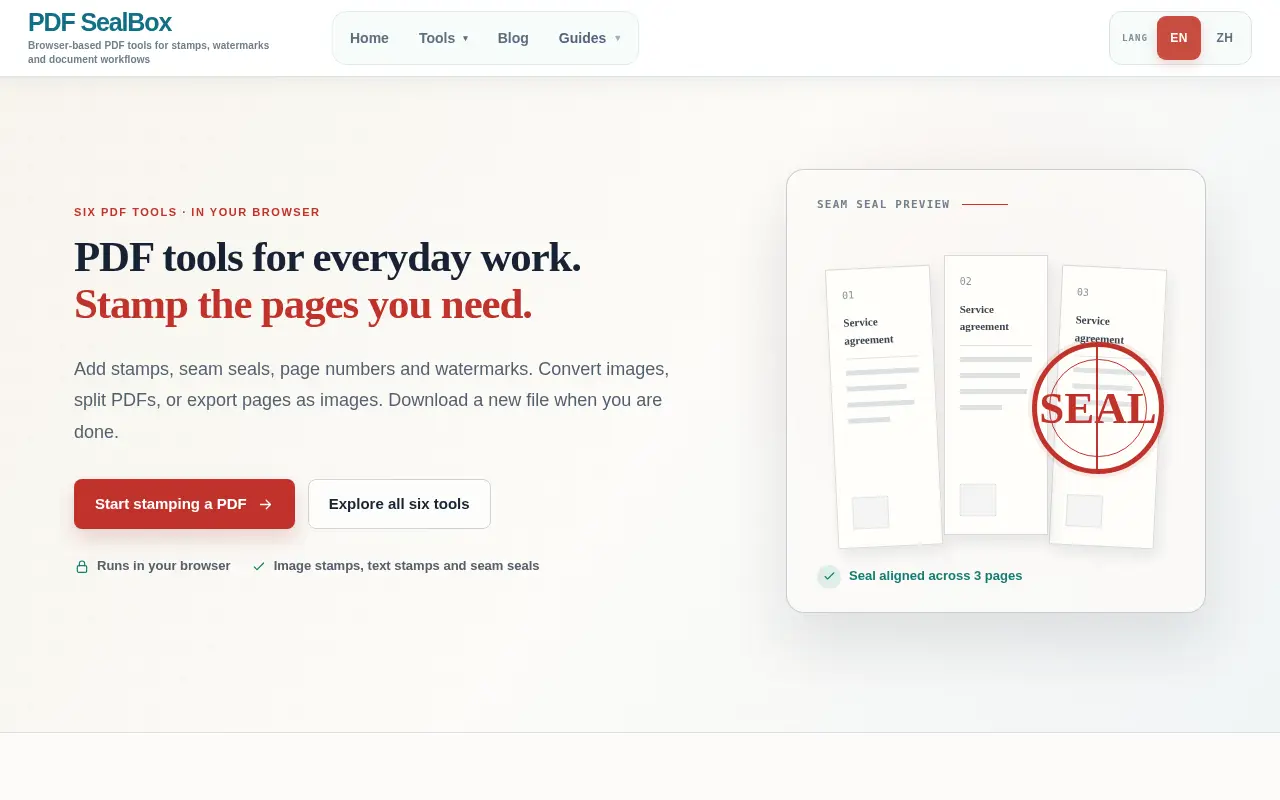
A small set of browser PDF tools built around stamping. Pick a preset mark or upload a seal image, set pages, size, opacity and rotation, preview it and download a new file. The site says common workflows are processed locally.
 PS
Project links
Visit productRequest correctionProject Note
A closer look at PDF SealBox
PDF SealBox adds visible stamps to a PDF in the browser, including preset marks like PAID or APPROVED, your own seal image, and a seam stamp split across page edges.
Print, stamp, scan, save again
If you've ever printed a PDF just to press a rubber stamp on it and feed it back through the scanner, you know how silly the loop feels. Marking a file as paid or approved shouldn't need a full PDF editor either. The developer of PDF SealBox says the tool came out of exactly that office habit: at work, PDFs were printed, stamped and scanned again for archiving, and the tool was built to avoid that waste. Colleagues now use it for routine archiving and add visible stamps without printing and rescanning each file.
It keeps the job to three steps. You choose a PDF, set up the stamp in a side panel, then check the preview and download a new file. The stamp can be a preset text mark such as PAID, RECEIVED, APPROVED or VOID, with REJECTED, COMPLETED, DRAFT, CONFIDENTIAL and COPY also on the list. Or you can upload your own seal as a PNG or JPG image.
You decide which pages get it, whether that's all pages, all except the first, the first or last only, or a custom range. Size, opacity and rotation are adjustable too.
The seam stamp is the clever bit
The less common feature is the seam stamp. It splits one seal across the edges of the pages, so that the mark only lines up when the pages are fanned together. That's a convention on multi-page contracts in some countries, used to show no page has been swapped.
Five other tools sit beside the stamp tool. They add page numbers, turn images into a PDF, add a watermark, split a PDF and convert PDF pages to images.
What to know before you stamp anything important
A stamp here is a picture on a page, and the site is careful about that. Its tool page says the output does not cover OCR, editing PDF text, certificate-based signatures or notarization. The terms add that a visible mark is not identity verification, notarisation or a certificate-backed signature, and tell users not to create misleading, fraudulent or unauthorised stamps. The developer is just as clear: it adds visible marks, not certificate-based digital signatures, and it doesn't claim legal validity. A seal image placed with this tool looks official and proves nothing by itself.
On privacy, the policy, marked as updated August 2026, says PDF files and stamp images are processed locally in your browser when supported, and that the site does not intentionally store uploaded PDF files for the browser stamping workflow. Note the qualifier. It's a statement about the common case, not an absolute promise. Cookies may be used for analytics and for advertising such as Google AdSense where enabled.
No price is shown on the site's pages, and the tools open without an account. The about page describes an independently developed project, operated by the PDF SealBox site operator, and gives no person or company name. It also mentions a Windows desktop app, though no download page was to be found on November 10, 2026. If your office still prints files just to stamp them for the archive, try it on one routine document and see how much paper you save.
In their words
From the team behind PDF SealBox
“At work, we printed PDFs to stamp and scan them for archiving. I built this tool to avoid that waste.”
“It adds visible marks, not certificate-based digital signatures, and it does not claim legal validity.”
“For routine archiving, adding a stamp in the PDF replaces the print, stamp, scan, and re-save loop.”
For reference
Project facts
The published details and source context, together in one place.
- Stage
- Launched
Project note details
Dates and editorial links
Published
November 10, 2026
Updated
November 12, 2026
Note history
Publication and substantive update dates for this public note.
- Nov 10, 2026
- Project note published.
- Nov 12, 2026
- Project note updated.
Want to come back to PDF SealBox?
Save it to this browser. Your Saved list marks projects whose note or updates changed since you last looked.
Keep exploring
More like PDF SealBox
- AyudándonosUtilities & Calculators · A reference site for people in Argentina.
- EveryTool4UUtilities & Calculators · Browser-based PDF, image, text, media and office utilities, with free access and per-tool processing notes.
- OpenP7MUtilities & Calculators · Opens signed .p7m attachments and Italian FatturaPA XML invoices in the browser without uploading them.
- PanelOSUtilities & Calculators · A Windows app that puts live PC stats, a clock, weather and now-playing info on a 3.5-inch USB case screen.
- MortmeterUtilities & Calculators · A free site that prices any activity by the odds it kills you, then turns that into time off your life at your age.
- Concrete CalculatorUtilities & Calculators · A free concrete estimator that turns your measurements into cubic yards, a bag count and an optional material cost, with no account.
- WatchToTextUtilities & Calculators · A free tool that turns a public YouTube link into a transcript you can copy or download as TXT, SRT or VTT.
- HouseRulerUtilities & Calculators · HouseRuler is a free 7th house ruler calculator for people learning relationship astrology, with written interpretations for each house placement and a paid personalised report.




For the makerAdd the badge to your site
If you made PDF SealBox, you can post about this note with a ready-to-edit announcement, or show it on your own site with an optional badge that links back here. Neither has any effect on the note or its placement.

Want to keep this note's facts current yourself? Project Radar Pro lets a verified maker confirm status, pricing and platforms in a labeled block, post one update a month and see the note's activity totals. It never changes the note's text or placement. See what Pro includes
Building something useful?
Submit your project for free. If selected, it gets a Project Note that explains what it does and links to your work. Publication isn't guaranteed.
Submit a project