MailPixel
A free email tracking pixel generator that is unusually candid about what a pixel can prove. You get an HTML snippet and a private activity link, and the site keeps reminding you that an image request isn't proof of a read.

Project links
Visit productRequest correctionProject Note
A closer look at MailPixel
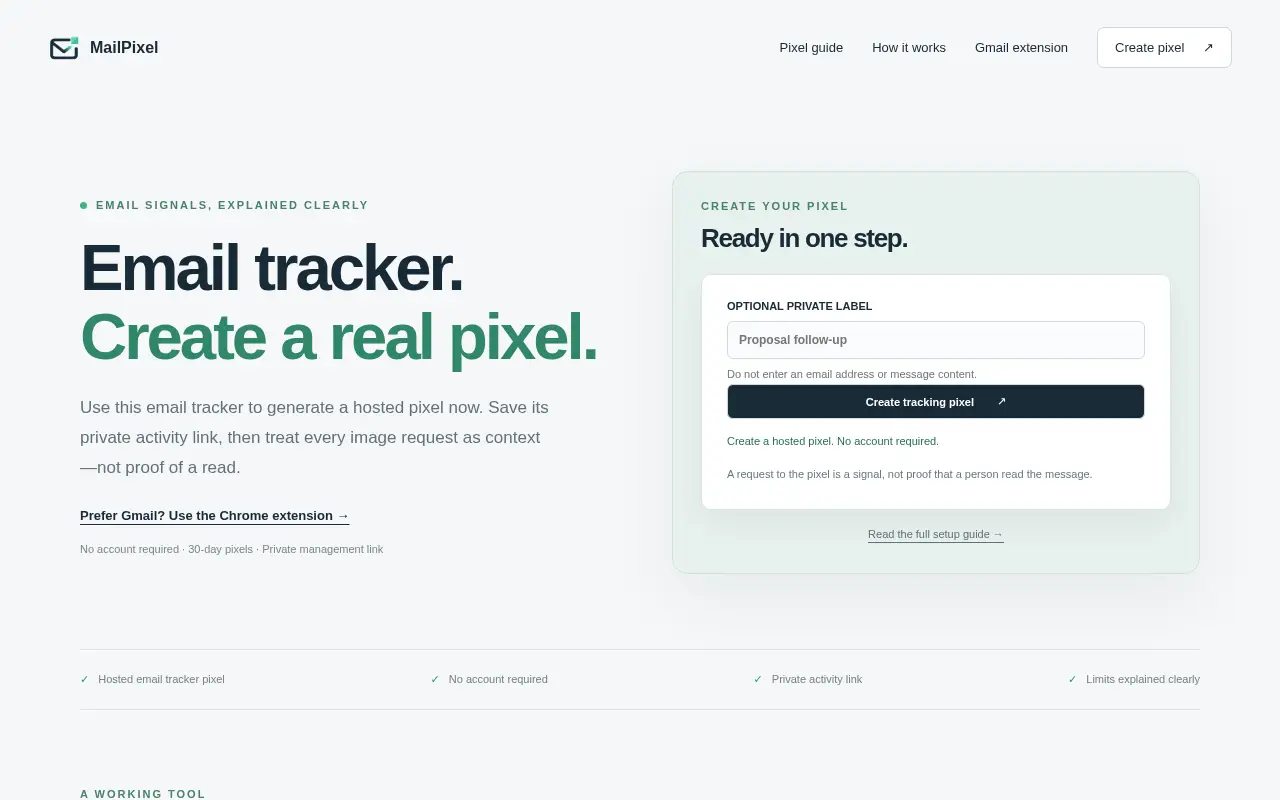
MailPixel generates a hosted tracking pixel for an email and shows when the image is requested. It's free, needs no account, and each pixel lasts 30 days.
A pixel, and a warning label
You sent the email that mattered, and now you're wondering if anyone opened it. A tracking pixel is the usual answer: a tiny image hidden in the message, and when the recipient's mail app loads it, the server that hosts it logs the request.
MailPixel does exactly that, for free, in one step. You press a button and get an HTML snippet, the pixel's URL and a private activity link.
What sets it apart is how often it tells you not to trust the result too much. It's upfront that a request to the pixel is a signal, not proof that a person read the message. Mail apps and privacy features can load images automatically, or block them, so an open may be a machine and a missing open may still be a read.
Thirty days and one private link
No account is needed. Each pixel records requests for 30 days. The activity page shows each valid image request with a server timestamp, and whoever holds the private link can pause or delete the pixel. That link is the only key. According to the privacy page, the service stores only a hash of the management secret, so there's no account recovery and it can't send a replacement link.
The form asks for an optional private label and tells you not to put an email address or message content in it.
Pasting raw HTML into an email isn't something every mail app allows, so Gmail users are also pointed to a separate Chrome extension that adds tracking while you compose. The extension has its own listing.
Think about the person on the other end
The same privacy page says that when the pixel is requested, the service records the server time and a conservative client classification, and that it does not store the raw request IP address or the complete user-agent string in the pixel event table. That's less than many trackers collect.
It's still tracking someone who hasn't been told. Nothing on the site indicates recipients are notified, and in some places consent rules apply to this kind of pixel, so that's yours to check before using it on people who wouldn't expect it. The site names no person or company as its operator.
If you want a quick signal on an email and you're happy to treat it as a hint, MailPixel is an easy one to try.
Project note details
Dates and editorial links
Published
November 10, 2026
Updated
November 12, 2026
Note history
Publication and substantive update dates for this public note.
- Nov 10, 2026
- Project note published.
- Nov 12, 2026
- Project note updated.
Want to come back to MailPixel?
Save it to this browser. Your Saved list marks projects whose note or updates changed since you last looked.
Keep exploring
More like MailPixel
- PoptinMarketing & SEO · Poptin turns website visitors into leads with popups and embedded forms, then follows up through segments, email campaigns and behavior-based automations.
- Image3DAI Image & Video · Image3D generates a 3D model from a single uploaded image or a text prompt and shows it in a browser viewer before you export.
- Backlinks ToolsMarketing & SEO · Backlinks Tools watches the pages that link to your site and emails you when a link breaks, disappears or turns nofollow.
- EchobellDeveloper Tools · Echobell turns a webhook or an email into a phone alert, including a call that rings when a server goes down.
- PixelArtHiveCreator Tools · A free browser converter that turns an image into pixel art at a set width, with 2 to 64 colors, retro palettes and dithering.
- MusicGo AI Music GeneratorAI & Skills · MusicGo generates songs from a written description, an image or a video, one track per request.
- FounderOmniSaaS · Nine small-business tools under one login, from SEO and analytics to email, forms, e-signatures and affiliate tracking, each priced on its own.
- GoSEOGEOMarketing & SEO · GoSEOGEO is an AI SEO tool for keyword research, GEO page checks, AI visibility and content workflows, usable on the web or through MCP.






For the makerAdd the badge to your site
If you made MailPixel, you can post about this note with a ready-to-edit announcement, or show it on your own site with an optional badge that links back here. Neither has any effect on the note or its placement.

Want to keep this note's facts current yourself? Project Radar Pro lets a verified maker confirm status, pricing and platforms in a labeled block, post one update a month and see the note's activity totals. It never changes the note's text or placement. See what Pro includes
Building something useful?
Submit your project for free. If selected, it gets a Project Note that explains what it does and links to your work. Publication isn't guaranteed.
Submit a project