
Pimg.pro
A free browser canvas for combining pictures side by side, stacked or in a grid, with crop, resize and batch edits that never leave your device.
Project links
Visit productRequest correctionProject Note
A closer look at Pimg.pro
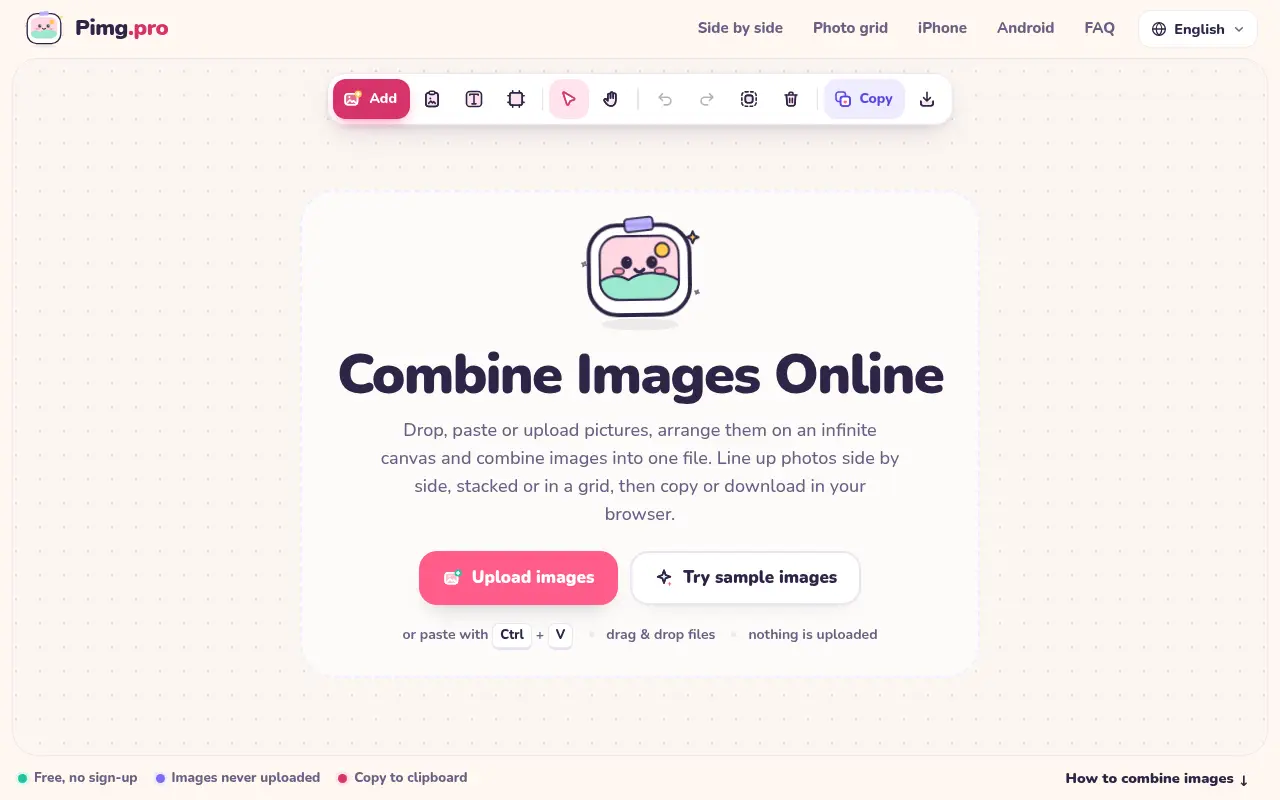
Pimg.pro is a free image combiner that runs in the browser. Drop or paste pictures onto a canvas, arrange them side by side, stacked or in a grid, crop and resize them, then copy or download one merged PNG, JPG or WebP. Nothing is uploaded.
Two screenshots, one image
It happens more often than it should. You want to show a before and after side by side, stack three screenshots into one tall image for a bug report, or post a 2x2 grid of holiday photos. The phone app wants a subscription, the website wants an upload, and you only needed thirty seconds of work.
Pimg.pro is a free canvas for exactly that. You drop, paste or upload pictures, push them around like prints on a table, and merge what you see into a single PNG, JPG or WebP. Side by side, stacked, a grid or exactly as placed, with a gap, a border, rounded corners and a background color if you want them. The result can go straight to your clipboard.
The small jobs around the merge
What makes it more than a two-button tool is the prep. You can crop to 1:1, 4:5, 16:9 and other common ratios, or to exact sizes such as an Instagram post, a passport photo or an A4 page, then resize to pixels, rotate and flip. You can add text in six fonts with an outline or shadow, or split one image into strips or a 3x3 grid. A batch mode applies the same steps to many files, such as compressing each one under 200 KB, and downloads them as a ZIP.
The site is clear about what it leaves out. There's no AI blending, no filters and no background removal. It won't export a PDF either, and there's no layers panel. It opens the common image formats, WebP, AVIF and SVG included, plus HEIC photos in Safari, and it runs in the browser on computers as well as iPhone, iPad and Android.
Where your pictures go
Nowhere, and that's the point. According to its privacy policy, updated November 17, 2026, images are processed only in your browser and the site has no server that receives them. Your canvas is saved in the browser's own storage so a refresh doesn't lose it, and deleted pictures sit in a local trash for up to 30 days. Once the page has loaded, it even works with Wi-Fi off.
The one thing that does go out is visit data. The site uses PVUV analytics, which sets a first-party cookie for up to about 13 months and records pages, approximate country and device details, but never the images. There are no ads, accounts or watermarks, and no daily limit. The site doesn't name the person behind it, only a contact address.
If you regularly glue screenshots together for work or posts, this is a pleasant tool to keep open. If you need filters or AI edits, look elsewhere, because it doesn't try to do those.
For reference
Project facts
The published details and source context, together in one place.
- Stage
- Launched
Project note details
Dates and editorial links
Published
November 21, 2026
Updated
November 21, 2026
Last checked
Nov 22, 2026
Last checked is the most recent date Pimg.pro's own public pages were visited for this note. Seen something that has changed since? Tell us and we'll fix it.
Note history
Publication and substantive update dates for this public note.
- Nov 21, 2026
- Project note published.
Want to come back to Pimg.pro?
Save it to this browser. Your Saved list marks projects whose note or updates changed since you last looked.
Keep exploring
More like Pimg.pro
- Binary TranslatorUtilities & Calculators · Free browser tool that turns binary into text and back, with clear hints when the input is off.
- MergePNGUtilities & Calculators · MergePNG combines several PNG files into one image, side by side, stacked or in a grid, inside your browser without uploading them.
- Free Image MergerUtilities & Calculators · Free Image Merger combines up to 20 images into one, in a row, a stack, a grid or a freestyle collage.
- ImgMin ProUtilities & Calculators · A free browser tool for batch image compression, format conversion and resizing.
- RankHush ToolsUtilities & Calculators · Fourteen free browser tools for images, QR codes, passwords, colors and developer data, with no sign-up and processing on your device.
- AnvilApps · An AI chat and image app for iPhone 15 Pro and newer that runs its models on the phone and works offline.
- ConfileoUtilities & Calculators · Free online toolbox of 101 PDF, OCR, image and document tools with strong Arabic and right-to-left support.
- EatWiseUtilities & Calculators · Free fast food nutrition calculators for 10 US chains, totaling calories, macros, sodium and caffeine for a customized order.






For the makerAdd the badge to your site
If you made Pimg.pro, you can post about this note with a ready-to-edit announcement, or show it on your own site with an optional badge that links back here. Neither changes the note's text or placement. This note's link to the project is marked as user-submitted until the project's site links back, for example with the badge, and is a full backlink while it does.

Want to keep this note's facts current yourself? Project Radar Pro lets a verified maker confirm status, pricing and platforms in a labeled block, post one update a month and see the note's activity totals. It never changes the note's text or placement. See what Pro includes
Building something useful?
Submit your project for free. If selected, it gets a Project Note that explains what it does and links to your work. Publication isn't guaranteed.
Submit a project