Convierte JPG
A free Spanish-language converter that turns HEIC, WebP, AVIF, PNG and other images into JPG in your browser, in batches of up to 30 files, with no account and no uploads.
Project links
Visit productRequest correctionProject Note
A closer look at Convierte JPG
Convert iPhone HEIC, WebP, PNG and more to JPG in batches, right in the browser. Free, in Spanish, no sign-up, no watermark.
The portal that only takes JPG
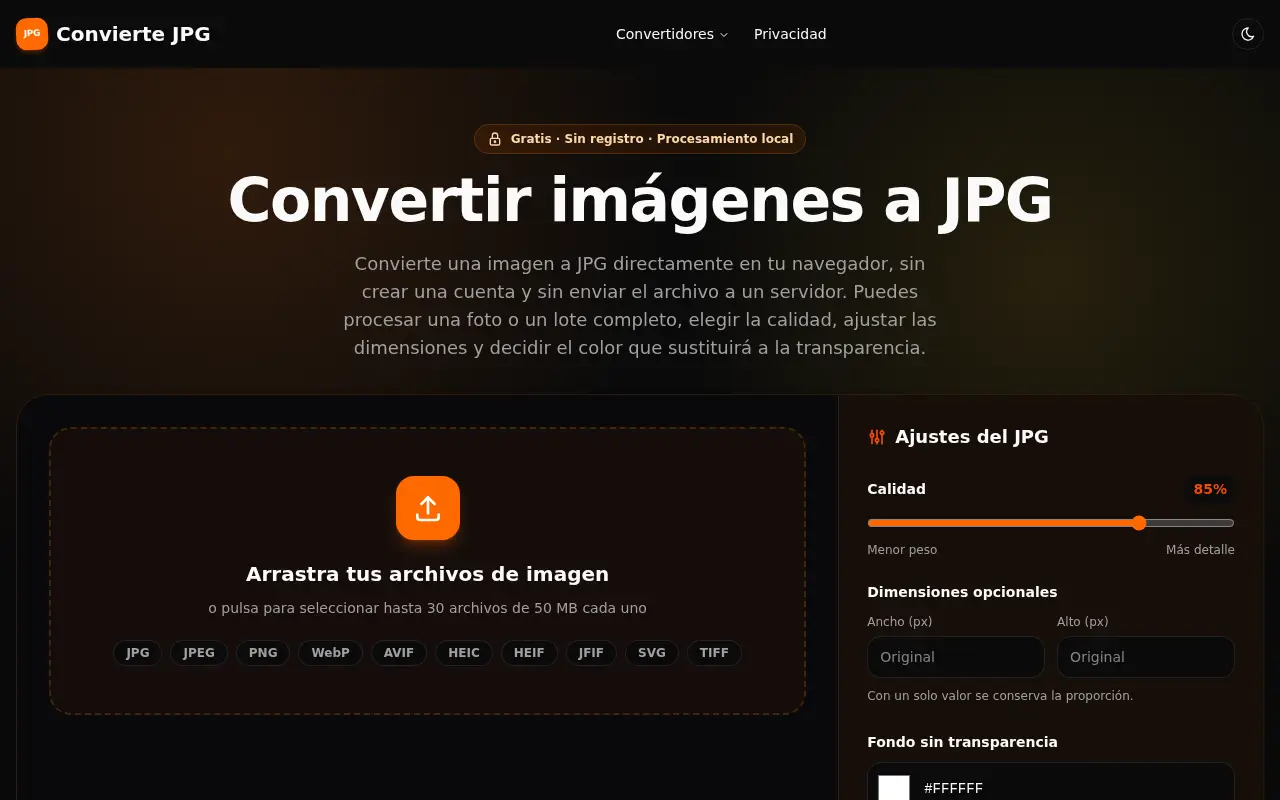
You're filling in an online form, and it rejects the photo you just took on your iPhone because it's a HEIC file. Or the image you saved from a website turns out to be WebP, and the program you use won't open it. Convierte JPG is a Spanish-language site built for exactly that moment, and it turns the awkward file into a plain JPG without making you install anything.
It accepts the formats that usually cause trouble, starting with HEIC and HEIF photos from iPhones and WebP or AVIF images from the web. PNGs with transparency work too, as do JFIF files with an extension some forms reject, SVG graphics and TIFF scans. You can drop in up to 30 files of 50 MB each and handle them as one batch.
A few sensible controls
The settings are short and useful. Quality starts at 85 percent, and you can drag it toward a lighter file or more detail. Leave width and height empty to keep each image's original size, or fill in just one value and the proportions stay intact. Because JPG can't hold transparency, you pick the color that fills those areas, white by default, which matters for logos and cut-out product shots.
When the batch finishes, the page shows the final size of each file, and you can download them one by one or all together in a ZIP. If a single file can't be decoded, it shows an error for that file without stopping the rest. Separate pages handle the reverse trip, from JPG to PNG, WebP and a few other formats.
What to know first
The whole site is in Spanish, so non-Spanish speakers will want browser translation. It's free, with no registration and no watermark.
According to its privacy policy, dated 31 July 2026, your images are processed in the browser and aren't sent to its servers, stored in an account or used to train models, and closing the tab clears the work list. The hosting provider may process ordinary technical data such as your IP address. The policy says the site may turn on a privacy-friendly analytics tool for aggregate visits, without naming one. One detail worth knowing: the new JPG doesn't copy EXIF data, GPS location or other metadata from the original. That's good for privacy, but keep the original if you need the date, camera details or a color profile.
The site doesn't name who runs it, and it lists no contact address, even though its policy points readers to one. Since nothing you convert leaves your device, that matters less than it would for a service that stores files.
If you or your family keep running into forms that only take JPG, this is a straightforward page to have on hand. If you need the date, location or camera details carried into the new file, this isn't the one, since the JPG leaves that metadata behind.
For reference
Project facts
The published details and source context, together in one place.
- Stage
- Launched
- Pricing
- Free
Project note details
Dates and editorial links
Published
November 14, 2026
Updated
November 14, 2026
Last checked
Nov 14, 2026
Last checked is the most recent date Convierte JPG's own public pages were visited for this note. Seen something that has changed since? Tell us and we'll fix it.
Note history
Publication and substantive update dates for this public note.
- Nov 14, 2026
- Project note published.
- Nov 14, 2026
- Project note updated.
Want to come back to Convierte JPG?
Save it to this browser. Your Saved list marks projects whose note or updates changed since you last looked.
Keep exploring
More like Convierte JPG
- zippicUtilities & Calculators · Free image compressor plus 19 more file tools for images, video and PDFs.
- HEICtoJPGerUtilities & Calculators · Free in-browser HEIC to JPG or PNG converter with no uploads or account.
- RankHush ToolsUtilities & Calculators · Fourteen free browser tools for images, QR codes, passwords, colors and developer data, with no sign-up and processing on your device.
- This Pic Can Change (HugeHard Studio)Apps · Convert, crop and compress photos, or turn a video clip into a GIF or Live Photo, on your iPhone.
- JPG to PDF by CleverHumanizerUtilities & Calculators · JPG to PDF by CleverHumanizer combines JPG, JPEG and PNG images into a single PDF without uploading them.
- GIFBloomUtilities & Calculators · Compress, edit and convert GIFs in batches of up to eight, right in the browser.
- HEIC.bestUtilities & Calculators · Convert, view and extract Live Photo video from iPhone HEIC files in your browser.
- HEIC to JPGUtilities & Calculators · HEIC to JPG at heictojpg.im converts iPhone HEIC and HEIF photos to JPG in the browser.




For the makerAdd the badge to your site
If you made Convierte JPG, you can post about this note with a ready-to-edit announcement, or show it on your own site with an optional badge that links back here. Neither changes the note's text or placement. This note's link to the project is marked as user-submitted until the project's site links back, for example with the badge, and is a full backlink while it does.

Want to keep this note's facts current yourself? Project Radar Pro lets a verified maker confirm status, pricing and platforms in a labeled block, post one update a month and see the note's activity totals. It never changes the note's text or placement. See what Pro includes
Building something useful?
Submit your project for free. If selected, it gets a Project Note that explains what it does and links to your work. Publication isn't guaranteed.
Submit a project