GIFBloom
A free kit of GIF tools that run in your browser: compress to a target size, trim, crop, reverse, add text, combine and convert. Up to eight files at once, nothing uploaded.
Project links
Visit productRequest correctionProject Note
A closer look at GIFBloom
Compress, edit and convert GIFs in batches of up to eight, right in the browser. Free, no account, files stay on your device.
More than a smaller file
Most GIF jobs are a little more than making the file smaller. A Discord emoji has to hit a size limit, a reaction loop needs two seconds trimmed off the end, or a screen recording should play slower so people can follow it. GIFBloom puts those jobs in one place, with a compressor at the front and a long shelf of editing tools behind it.
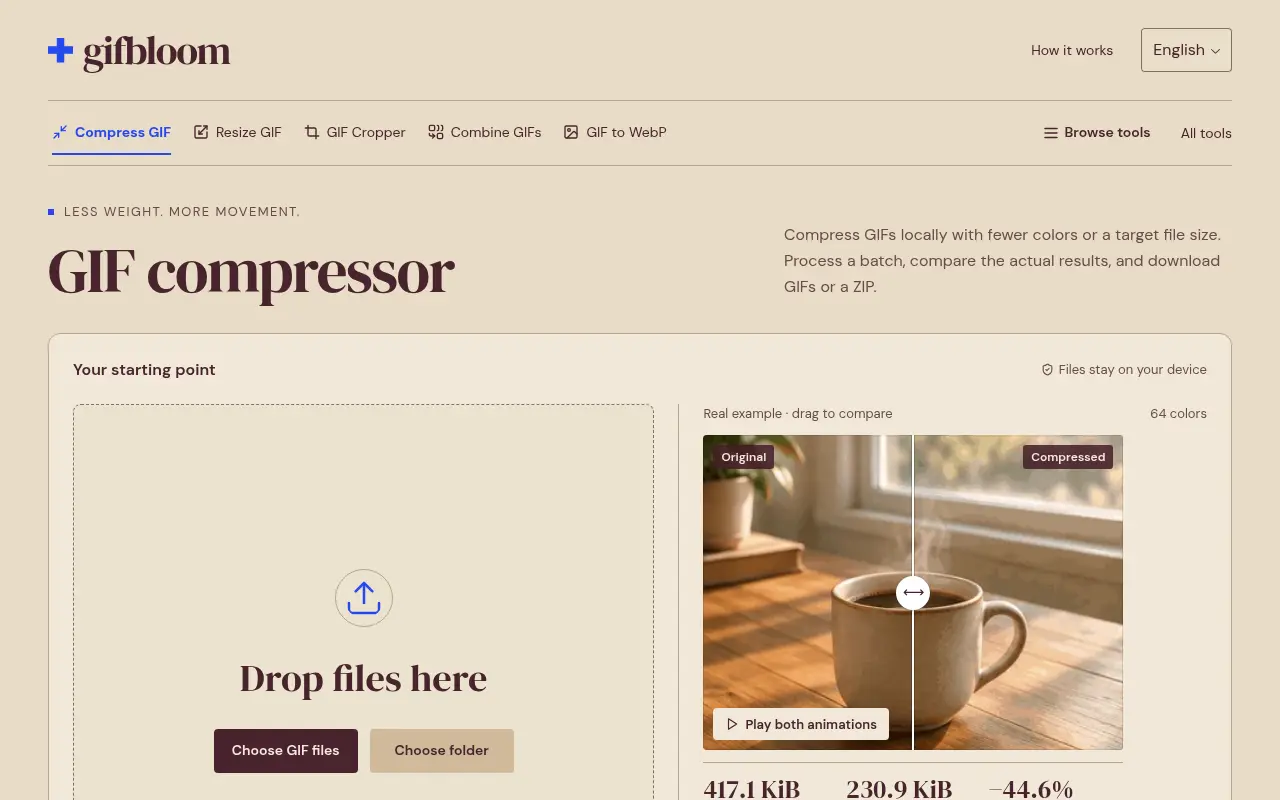
The compressor reduces colors or aims at a target size, with ready-made starting points of 256 KB, 512 KB, 1 MB and 10 MB. You can drop in up to eight GIFs or a ZIP, apply the same settings to all of them and download a ZIP back. A slider compares the original and the result, and the site's own sample went from 417 KB to 231 KB at 64 colors, with a note that another file will give a different result.
The editing shelf
The tools list reads like every small GIF annoyance someone has run into. There's a trimmer, a cropper, a speed changer and a reverse tool, a frame editor for pulling out a single bad frame, and an Add Text tool for captions. A Redact tool covers part of an animation, which is handy before sharing a screen recording. Makers and converters handle APNG, WebP, sprite sheets and video, and presets cover Discord banners, stickers and profile pictures as well as Twitch emotes.
The about page goes into a level of detail you rarely see. It explains that a job is limited to 40 million decoded pixels and about 192 MiB of working memory, and it warns that a frame delay of zero or 10 milliseconds is read as 100 milliseconds, so an animation that plays fast elsewhere may slow down after export. That's the kind of thing that saves a confused half hour.
What happens to your files
According to its privacy policy, file contents, file names and previews stay in browser memory and are never uploaded; refreshing the page clears them. The site is hosted on Vercel and counts visits three ways: a self-hosted Plausible that sets no cookies, Vercel Web Analytics, and Google Analytics 4, which uses first-party cookies. The policy also says GIFBloom may show Google AdSense ads that use advertising cookies. The policy page carries no date.
It's free, with no account or subscription, and the terms describe the current version as having no paid service commitment. The site names no person or company behind it, which matters less when your files never leave your device.
If you're the person in your group chat or Discord server who always ends up fixing the GIFs, this is a toolbox worth keeping open. The one case where it isn't a fit yet is a very heavy animation, because a job is limited to 40 million decoded pixels.
For reference
Project facts
The published details and source context, together in one place.
- Stage
- Live but early
- Pricing
- Free
Project note details
Dates and editorial links
Published
November 14, 2026
Updated
November 14, 2026
Last checked
Nov 15, 2026
Last checked is the most recent date GIFBloom's own public pages were visited for this note. Seen something that has changed since? Tell us and we'll fix it.
Note history
Publication and substantive update dates for this public note.
- Nov 14, 2026
- Project note published.
- Nov 14, 2026
- Project note updated.
Want to come back to GIFBloom?
Save it to this browser. Your Saved list marks projects whose note or updates changed since you last looked.
Keep exploring
More like GIFBloom
- zippicUtilities & Calculators · Free image compressor plus 19 more file tools for images, video and PDFs.
- GifSlimUtilities & Calculators · Shrink a GIF or turn a short video into one, right in the browser.
- Free Image ConverterUtilities & Calculators · A free in-browser image converter, compressor and resizer for JPG, PNG, WebP, HEIC, AVIF and PDF.
- RankHush ToolsUtilities & Calculators · Fourteen free browser tools for images, QR codes, passwords, colors and developer data, with no sign-up and processing on your device.
- MOV CompressorUtilities & Calculators · MOV Compressor shrinks QuickTime MOV videos into MP4 files inside the browser, without uploading them.
- Convierte JPGUtilities & Calculators · Convert iPhone HEIC, WebP, PNG and more to JPG in batches, right in the browser.
- This Pic Can Change (HugeHard Studio)Apps · Convert, crop and compress photos, or turn a video clip into a GIF or Live Photo, on your iPhone.
- ConfileoUtilities & Calculators · Free online toolbox of 101 PDF, OCR, image and document tools with strong Arabic and right-to-left support.




For the makerAdd the badge to your site
If you made GIFBloom, you can post about this note with a ready-to-edit announcement, or show it on your own site with an optional badge that links back here. Neither changes the note's text or placement. This note's link to the project is marked as user-submitted until the project's site links back, for example with the badge, and is a full backlink while it does.

Want to keep this note's facts current yourself? Project Radar Pro lets a verified maker confirm status, pricing and platforms in a labeled block, post one update a month and see the note's activity totals. It never changes the note's text or placement. See what Pro includes
Building something useful?
Submit your project for free. If selected, it gets a Project Note that explains what it does and links to your work. Publication isn't guaranteed.
Submit a project