zippic
Twenty free browser tools for compressing, cropping and converting images, video and documents. Files are processed on your device, and the site is supported by ads.
Project links
Visit productRequest correctionProject Note
A closer look at zippic
Free image compressor plus 19 more file tools for images, video and PDFs. No account, no uploads for processing, ad-supported.
A file is too big, again
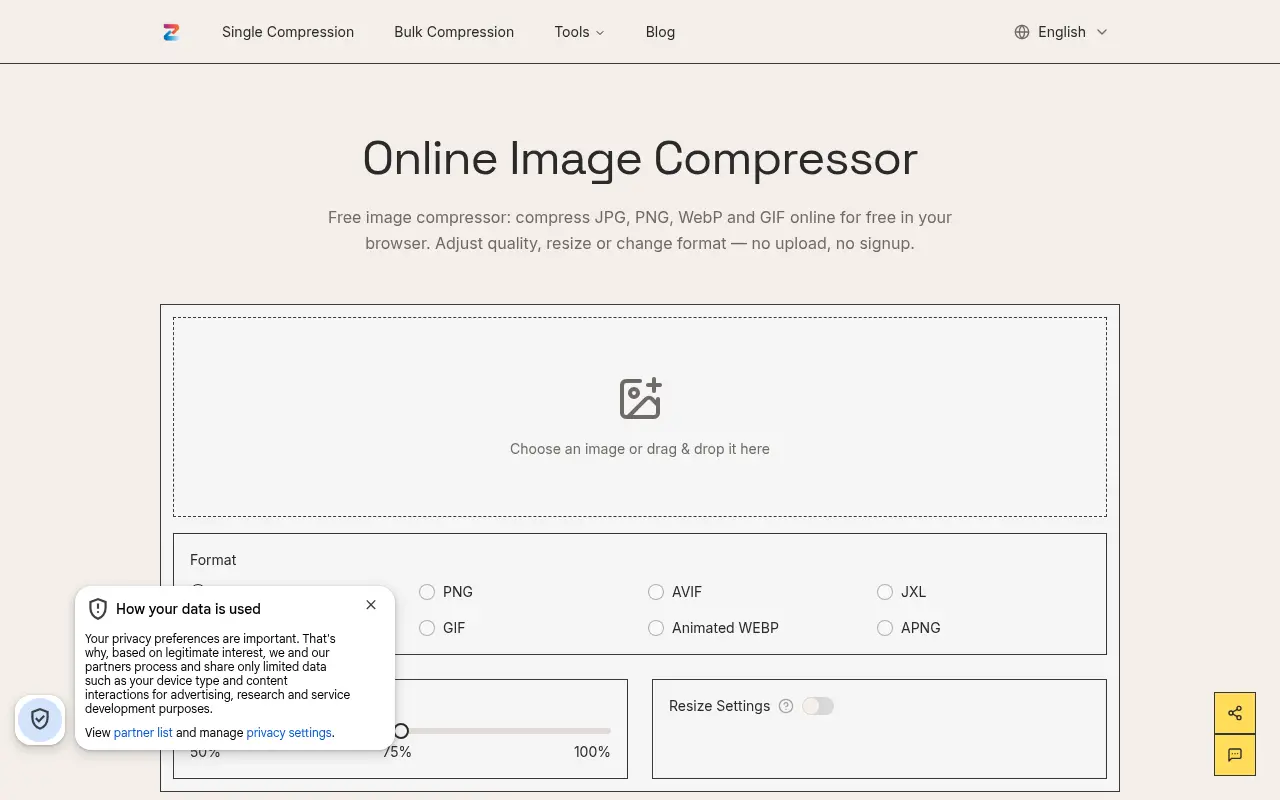
A form wants an image under 1 MB, a photo came off an iPhone as HEIC, or a PDF needs merging before you send it. zippic gathers 20 small tools for jobs like these on one site, and the main one is an image compressor. You pick a file, choose an output format and a quality level, and download the result.
The compressor starts at 75 percent quality and lets you switch formats, including JPG, PNG, WebP and AVIF, or resize the pixel dimensions if lowering quality isn't enough. The page is practical about results: it suggests comparing the output with the original, and it explains that an image which was already heavily compressed can come out larger, so you should start from the original file.
More than a compressor
The rest of the toolkit covers the chores around images and documents. A bulk compressor and bulk cropper handle a folder of product photos in one go. The HEIC converter deals with iPhone photos, the PSD converter opens Photoshop files for people without Photoshop, and a grid splitter cuts one image into tiles for a social post. On the document side you can turn PDF pages into images, merge PDFs, shrink PDF and Word files, and extract text from a screenshot with OCR. Video tools convert clips, crop a segment and turn MP4 or WebM into a GIF.
All of this runs in your browser using WebAssembly and Web Workers, so your source files aren't sent to zippic for processing, and the size limit is mostly your browser's memory. The compressor suggests staying under 50 MB. The interface is available in 12 languages.
The trade-offs to know
zippic is free and needs no account. It pays for itself with Google AdSense, and according to its privacy policy, last updated 7 November 2026, those ads may be personalized. It also runs Google Analytics 4 and Cloudflare Web Analytics, and on some analytics events the file name and file sizes for a job you run are sent along, though never the file contents. If you'd rather not share file names, rename the file before you start. The feedback form records your IP address and browser details, and messages may be forwarded through email and Telegram.
The site doesn't name the person or company behind it; there's a contact email and an X account. Since files stay on your device, that matters less here than for a tool that stores uploads. One more thing: zippic isn't Zipic, an unrelated macOS app, as its own about page points out.
If you keep bouncing between single-purpose converter sites, zippic is a handy place to bookmark for the everyday file jobs. If you'd rather steer clear of ad-supported tools, this one isn't for you, since AdSense is what pays the bills here.
For reference
Project facts
The published details and source context, together in one place.
- Stage
- Launched
- Pricing
- Free
Project note details
Dates and editorial links
Published
November 14, 2026
Updated
November 14, 2026
Last checked
Nov 15, 2026
Last checked is the most recent date zippic's own public pages were visited for this note. Seen something that has changed since? Tell us and we'll fix it.
Note history
Publication and substantive update dates for this public note.
- Nov 14, 2026
- Project note published.
- Nov 14, 2026
- Project note updated.
Want to come back to zippic?
Save it to this browser. Your Saved list marks projects whose note or updates changed since you last looked.
Keep exploring
More like zippic
- GifSlimUtilities & Calculators · Shrink a GIF or turn a short video into one, right in the browser.
- RankHush ToolsUtilities & Calculators · Fourteen free browser tools for images, QR codes, passwords, colors and developer data, with no sign-up and processing on your device.
- HEICtoJPGerUtilities & Calculators · Free in-browser HEIC to JPG or PNG converter with no uploads or account.
- HEIC.bestUtilities & Calculators · Convert, view and extract Live Photo video from iPhone HEIC files in your browser.
- Convierte JPGUtilities & Calculators · Convert iPhone HEIC, WebP, PNG and more to JPG in batches, right in the browser.
- PiSpace ToolsUtilities & Calculators · 74 free browser tools for images, PDFs, video, audio and text that process files on your device, with no uploads, account or ads.
- LizelyUtilities & Calculators · Lizely is a free collection of browser tools for PDFs, images, text and code.
- MergePNGUtilities & Calculators · MergePNG combines several PNG files into one image, side by side, stacked or in a grid, inside your browser without uploading them.






For the makerAdd the badge to your site
If you made zippic, you can post about this note with a ready-to-edit announcement, or show it on your own site with an optional badge that links back here. Neither changes the note's text or placement. This note's link to the project is marked as user-submitted until the project's site links back, for example with the badge, and is a full backlink while it does.

Want to keep this note's facts current yourself? Project Radar Pro lets a verified maker confirm status, pricing and platforms in a labeled block, post one update a month and see the note's activity totals. It never changes the note's text or placement. See what Pro includes
Building something useful?
Submit your project for free. If selected, it gets a Project Note that explains what it does and links to your work. Publication isn't guaranteed.
Submit a project