HEIC.best
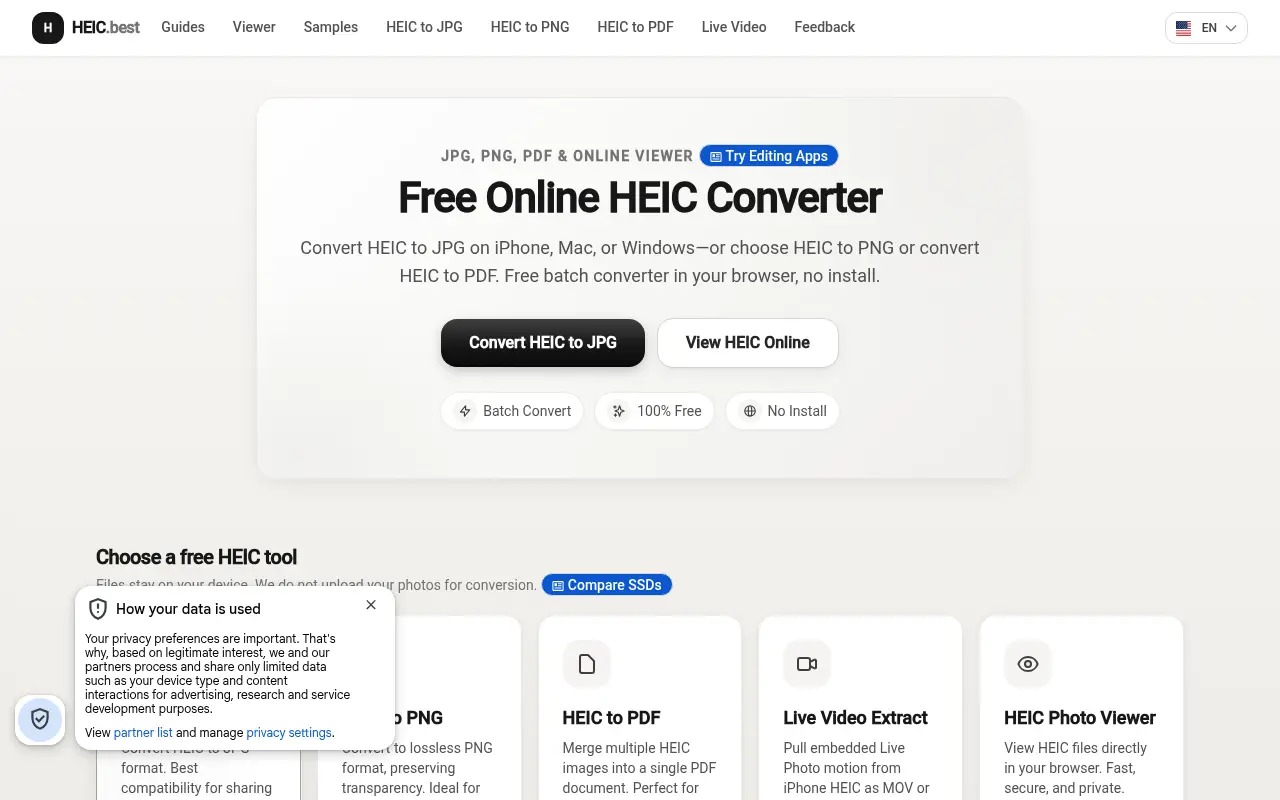
Free browser tools for iPhone HEIC photos: convert to JPG, PNG or PDF in batches, view HEIC files, and pull the motion out of a Live Photo as a video.
Project links
Visit productRequest correctionProject Note
A closer look at HEIC.best
Convert, view and extract Live Photo video from iPhone HEIC files in your browser. Free, no account, conversion stays on your device.
The photos your PC won't open
An iPhone saves photos as HEIC to keep them small, which is great until you copy a batch to a Windows laptop or try to attach one to a website that only takes JPG. HEIC.best is a small set of free tools for that gap, and it runs in your browser with no install or account.
The main converter turns HEIC into JPG for sharing and printing, PNG for editing, or a single PDF that merges several photos, which is handy for sending receipts or a set of pages as one file. You can add many images at once; the site says there's no fixed file limit, so clearing out a camera roll is one job rather than fifty.
The Live Photo trick
The tool that sets HEIC.best apart is Live Video Extract. Many iPhone photos are Live Photos, with a second or two of motion stored inside the file. This tool pulls that motion out as an MOV or MP4 video, so the moment your kid blew out the candles can go somewhere other than an iPhone. There's also a viewer for opening HEIC files in the browser without converting anything, and a set of guides on handling HEIC on Windows 10 and 11, comparing HEIC with JPG, and more.
The site says it isn't affiliated with Apple, MPEG or Microsoft, and its about page describes it as an independent project, with a contact email for questions and corrections.
Read the privacy page carefully
According to its privacy policy, last updated in May 2026, photos and videos are processed on your device and aren't uploaded for conversion, and support emails are kept for up to 90 days. That part matches how the tools are described. The cookie section is a different story. It says the site doesn't use tracking cookies or advertising networks that collect personal information for targeted ads, but the pages load Google AdSense, Google Analytics and Microsoft Clarity, which the policy doesn't mention. Your photos still stay local, but expect ads and analytics while you use it.
The terms also mention a licence to images you upload, which sits oddly with a tool that says nothing is uploaded; the privacy policy is the clearer statement of how files are handled. No person or company is named as the operator.
If you just need a stack of iPhone photos as JPGs, or want to save the video from a favorite Live Photo, HEIC.best does the job quickly and for free. If ads and analytics scripts on a page bother you, you may be happier with a different converter.
For reference
Project facts
The published details and source context, together in one place.
- Stage
- Public launch
- Pricing
- Free
Project note details
Dates and editorial links
Published
November 14, 2026
Updated
November 14, 2026
Last checked
Nov 14, 2026
Last checked is the most recent date HEIC.best's own public pages were visited for this note. Seen something that has changed since? Tell us and we'll fix it.
Note history
Publication and substantive update dates for this public note.
- Nov 14, 2026
- Project note published.
- Nov 14, 2026
- Project note updated.
Want to come back to HEIC.best?
Save it to this browser. Your Saved list marks projects whose note or updates changed since you last looked.
Keep exploring
More like HEIC.best
- GIFBloomUtilities & Calculators · Compress, edit and convert GIFs in batches of up to eight, right in the browser.
- HEICtoJPGerUtilities & Calculators · Free in-browser HEIC to JPG or PNG converter with no uploads or account.
- Free Image ConverterUtilities & Calculators · A free in-browser image converter, compressor and resizer for JPG, PNG, WebP, HEIC, AVIF and PDF.
- zippicUtilities & Calculators · Free image compressor plus 19 more file tools for images, video and PDFs.
- MOV CompressorUtilities & Calculators · MOV Compressor shrinks QuickTime MOV videos into MP4 files inside the browser, without uploading them.
- Convierte JPGUtilities & Calculators · Convert iPhone HEIC, WebP, PNG and more to JPG in batches, right in the browser.
- SKPDowngradeUtilities & Calculators · SKPDowngrade converts SketchUp files saved in 2024, 2025 or 2026 into a version that SketchUp 2017 through 2025 can open.
- HEIC to JPGUtilities & Calculators · HEIC to JPG at heictojpg.im converts iPhone HEIC and HEIF photos to JPG in the browser.




For the makerAdd the badge to your site
If you made HEIC.best, you can post about this note with a ready-to-edit announcement, or show it on your own site with an optional badge that links back here. Neither changes the note's text or placement. This note's link to the project is marked as user-submitted until the project's site links back, for example with the badge, and is a full backlink while it does.

Want to keep this note's facts current yourself? Project Radar Pro lets a verified maker confirm status, pricing and platforms in a labeled block, post one update a month and see the note's activity totals. It never changes the note's text or placement. See what Pro includes
Building something useful?
Submit your project for free. If selected, it gets a Project Note that explains what it does and links to your work. Publication isn't guaranteed.
Submit a project