Gamepad Tester
A browser tool for inspecting controller buttons, triggers, stick movement, and supported vibration.
Project links
Visit productRequest correctionProject Note
A closer look at Gamepad Tester
A browser tool for inspecting controller buttons, triggers, stick movement, and supported vibration.
See what the browser receives
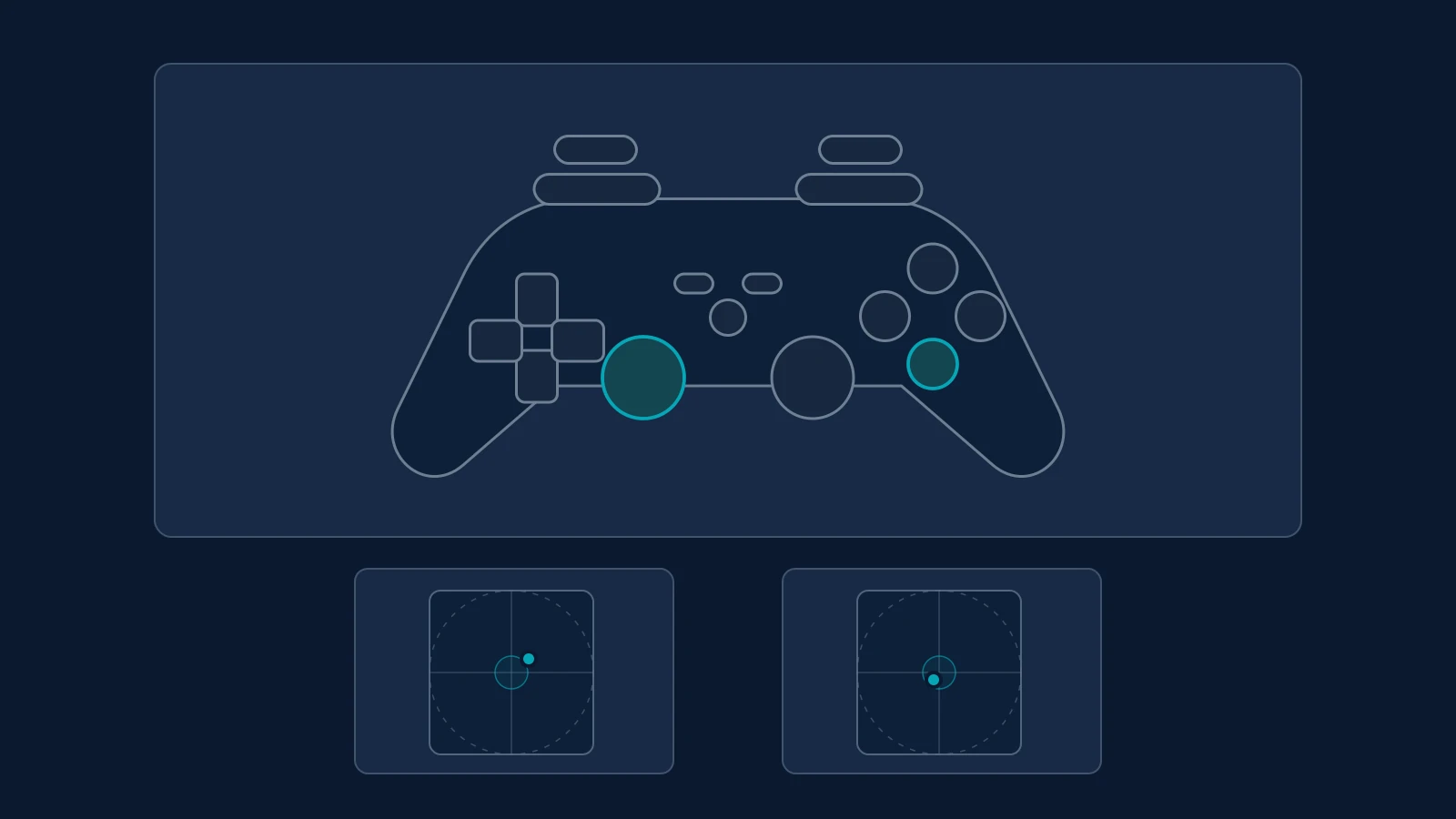
Elegant Matter Gamepad Tester presents controller input through a browser. The page waited for a connected controller during this first look. Hardware input and measurement accuracy are Not reviewed. Connect an Xbox, PlayStation, Nintendo or generic USB or Bluetooth controller and press a button, since some browsers only expose a controller after you interact with it. The input map lights up each control as you press it, using a PlayStation/DualSense, Xbox, Switch Pro or generic layout chosen from the device name or picked by hand. The button test marks every input you've tried and keeps each trigger's peak value, so a missed control is easy to spot. If the browser doesn't report the standard mapping, the page says so and recommends trusting the raw button numbers instead.
Drift needs context
The documentation describes a five-second resting-stick test and an optional full-range sweep. It explains center offset, a neutral envelope, and maximum movement without treating one percentage as a universal pass or fail. Browser mapping and a game's deadzone affect how a result should be interpreted. The full-range sweep asks you to push a stick to its edge and rotate it two or three times, then reports coverage across 24 directions with minimum, median and maximum reach. Diagonal values above 100% can be normal, because the browser normalizes the X and Y axes separately. A session summary lists untested inputs, drift and sweep results and vibration, and you can copy it, which can help when you need to describe a fault.
Know the measurement limits
The page says its deadzone control is a visual reference, not calibration. Browser input also differs from physical stick travel and end-to-end latency. Missing web vibration support does not establish broken hardware. Compare a familiar controller over USB and Bluetooth to see whether the connection changes the result. Vibration behavior and the site's local-processing claim are Not reviewed. Vibration can be tested on the strong and weak channels separately, and the page asks whether you felt it. The tool is free, needs no account and says it runs in your browser with data staying on your device. It comes from Elegant Matter, an independent technology publication, whose privacy policy, updated October 20, 2026, says the policy would be updated if a future tool needed remote processing, an account or stored inputs.
For reference
Project facts
The published details and source context, together in one place.
- Stage
- Live but early
- Public Context Check
- Public pages were checked Sep 21, 2026.
Project note details
Dates and editorial links
Published
September 24, 2026
Updated
November 7, 2026
Note history
Publication and substantive update dates for this public note.
- Sep 24, 2026
- Project note published.
- Nov 7, 2026
- Project note updated.
- Sep 21, 2026
- Public-page information added to the note.
Want to come back to Gamepad Tester?
Save it to this browser. Your Saved list marks projects whose note or updates changed since you last looked.
Keep exploring
More like Gamepad Tester
- MultifateUtilities & Calculators · Chart tools and AI-assisted interpretations for tarot and traditional Chinese divination systems.
- MouseCheckUtilities & Calculators · MouseCheck is a free online mouse test.
- Device-TestUtilities & Calculators · Device-Test runs more than 20 hardware checks in your browser, from microphone and camera to keyboard, gamepad and dead-pixel tests.
- Keyboard TesterUtilities & Calculators · Keyboard Tester shows a full-size 104-key layout in your browser and lights up each key as you press it, counting what is left to test.
- PC TweakerUtilities & Calculators · A Windows utility for inspecting and changing gaming, privacy and maintenance settings, with restoration for supported tweaks.
- PanelOSUtilities & Calculators · A Windows app that puts live PC stats, a clock, weather and now-playing info on a 3.5-inch USB case screen.
- MortmeterUtilities & Calculators · A free site that prices any activity by the odds it kills you, then turns that into time off your life at your age.
- Concrete CalculatorUtilities & Calculators · A free concrete estimator that turns your measurements into cubic yards, a bag count and an optional material cost, with no account.


For the makerAdd the badge to your site
If you made Gamepad Tester, you can post about this note with a ready-to-edit announcement, or show it on your own site with an optional badge that links back here. Neither has any effect on the note or its placement.

Want to keep this note's facts current yourself? Project Radar Pro lets a verified maker confirm status, pricing and platforms in a labeled block, post one update a month and see the note's activity totals. It never changes the note's text or placement. See what Pro includes
Building something useful?
Submit your project for free. If selected, it gets a Project Note that explains what it does and links to your work. Publication isn't guaranteed.
Submit a project