TypeNod
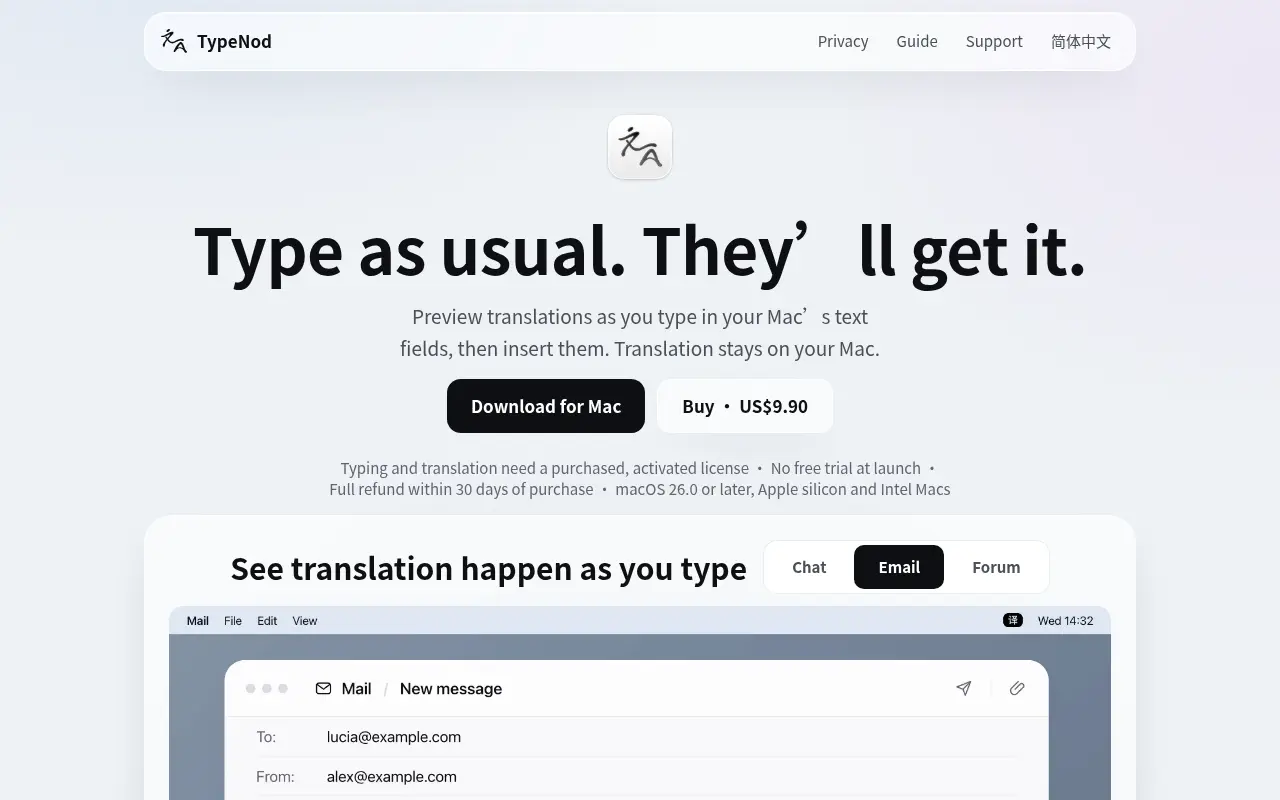
A Mac input method that previews a translation as you type in English, Spanish, French or Chinese Pinyin, then drops it into the field, using Apple's on-device translation.
Project links
Visit productRequest correctionProject Note
A closer look at TypeNod
Translate as you type in any Mac text field, on-device, for a one-time US$9.90. Needs macOS 26 or later.
Writing to someone who reads another language
If you chat or email across languages, you probably know the routine: write the message, copy it into a translator, copy the result back, check it, send. It works, but it breaks your train of thought every time, and you're pasting private messages into someone else's website.
TypeNod tries to fold that routine into the keyboard itself. It's a Mac input method from SELFARK LTD, a company registered in England and Wales, first released on 11 October 2026.
Type once, insert the translation
You switch to TypeNod like any other input source and type in English, Spanish, French or Simplified Chinese Pinyin. A small panel shows the translation updating as you go. In Chinese mode, Space picks the Chinese text and a second Space inserts the English; in the other languages, Return inserts the translation. Tab switches between the original and the translated text, and you can change the target language from the panel.
Translation comes from Apple's on-device engine, so it works offline once the language resources are downloaded. It runs in apps that use the standard macOS text input system, and the support page names WeChat, Messages, Telegram, Safari, Chrome and Mail among them.
The support page is unusually frank about quirks. Clicking an app's Send button mid-composition sends your original text, not the translation, so insert first. Spell check and autocorrect don't work inside an English, Spanish or French composition, and holding a letter won't bring up accent choices. And translations can contain errors, so names, numbers, dates and amounts deserve a second look.
Before you buy
TypeNod costs US$9.90 once, tax included, for a lifetime Mac license covering all your Macs and future Mac updates. There's no free trial, but you can ask for a full refund within 30 days. It needs macOS 26 or later, on Apple silicon or Intel, and comes as a signed, notarized download from the website rather than the Mac App Store. An iPhone version is in development and isn't included.
On privacy, the policy says what you type is never uploaded or saved as history, and the app never touches the clipboard. Pinyin mode remembers the words you choose, on your Mac, so frequent ones come first. The input method itself doesn't go online; update checks request version information only. Purchases run through Link and Stripe, which pass your name and email to the developer to issue the license.
If you write in a second language every day on a recent Mac, it's a neat way to keep translation inside the text box. If you're on an older macOS, or you need spell check while composing, it isn't for you yet.
Project note details
Dates and editorial links
Published
November 16, 2026
Updated
November 16, 2026
Last checked
Nov 17, 2026
Last checked is the most recent date TypeNod's own public pages were visited for this note. Seen something that has changed since? Tell us and we'll fix it.
Note history
Publication and substantive update dates for this public note.
- Nov 16, 2026
- Project note published.
Want to come back to TypeNod?
Save it to this browser. Your Saved list marks projects whose note or updates changed since you last looked.
Keep exploring
More like TypeNod
- RankHush ToolsUtilities & Calculators · Fourteen free browser tools for images, QR codes, passwords, colors and developer data, with no sign-up and processing on your device.
- Binary TranslatorUtilities & Calculators · Free browser tool that turns binary into text and back, with clear hints when the input is off.
- Binary Code TranslatorUtilities & Calculators · Binary Code Translator converts binary to text and text to binary in the browser, handles messy pasted input, Unicode and emoji, and needs no sign-up.
- TransglotDeveloper Tools · AI translation for app, website and store strings, with placeholder, plural, glossary and length checks before anything ships.
- Take DictationApps · Take Dictation is a private Mac dictation app: hold a key, speak, and cleaned-up text appears where you type, processed on your Mac for $39 once.
- Manga TranslatorAI Image & Video · Manga Translator translates uploaded manga, manhwa and webtoon pages, erases the original text and letters the translation back onto the art.
- TranslyApps · Transly translates what you type, say and watch.
- Elmren VoiceApps · A one-time-purchase Mac app that turns your own text into local text-to-speech audio, read-along pages and video, with optional voice cloning.






For the makerAdd the badge to your site
If you made TypeNod, you can post about this note with a ready-to-edit announcement, or show it on your own site with an optional badge that links back here. Neither changes the note's text or placement. This note's link to the project is marked as user-submitted until the project's site links back, for example with the badge, and is a full backlink while it does.

Want to keep this note's facts current yourself? Project Radar Pro lets a verified maker confirm status, pricing and platforms in a labeled block, post one update a month and see the note's activity totals. It never changes the note's text or placement. See what Pro includes
Building something useful?
Submit your project for free. If selected, it gets a Project Note that explains what it does and links to your work. Publication isn't guaranteed.
Submit a project