darken.video
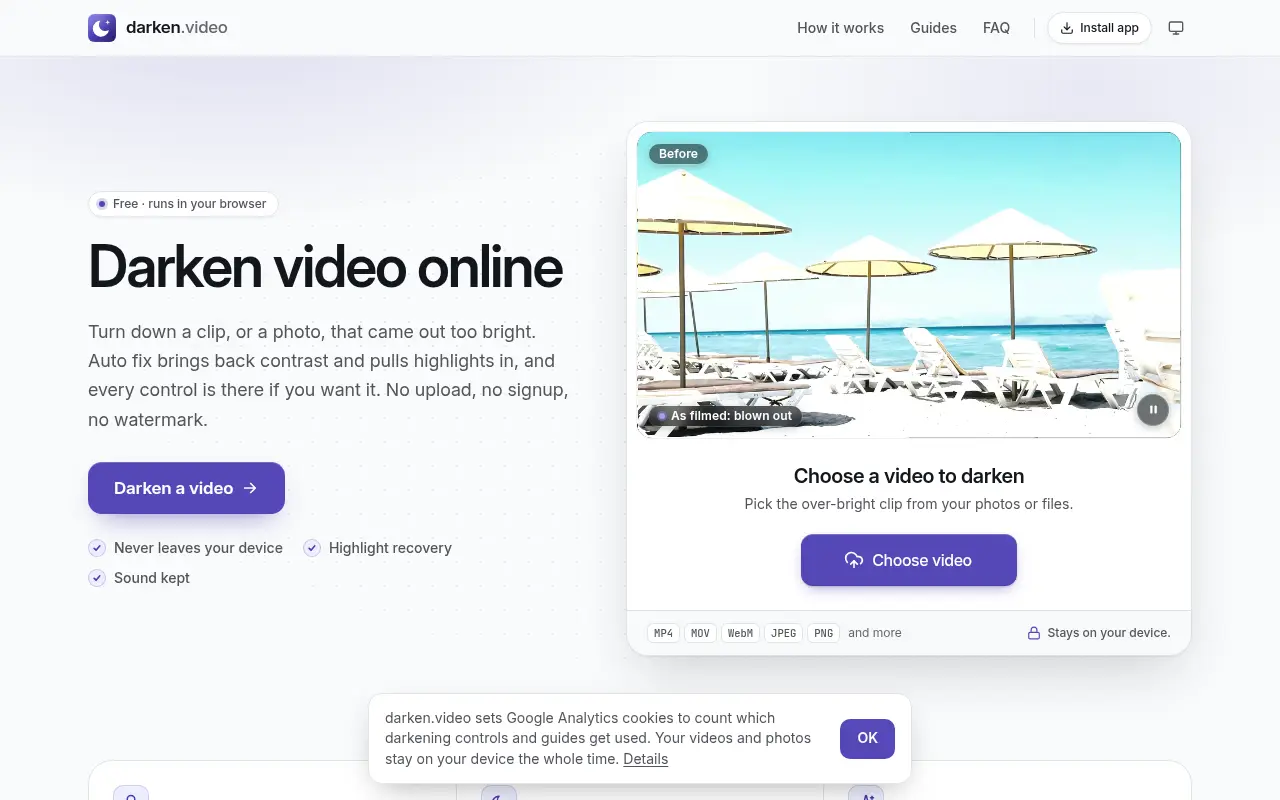
A free tool for overexposed clips and photos. Auto fix sets a correction, five looks cover harsh sun, blown-out skies and a day-for-night grade, and a split view shows before and after.

Project links
Visit productRequest correctionProject Note
A closer look at darken.video
darken.video turns down a video or photo that came out too bright, pulling highlights back before lowering exposure. It runs in your browser with no upload or watermark.
When the sun wins
You get home, open the clip from the beach or the ski slope, and the whole thing is washed out. Turning down brightness alone tends to leave a grey, flat picture. darken.video's Auto fix works in a different order. As the site describes it, the tool pulls the highlights back first and then sets exposure, contrast and blacks, so the clip gets darker while keeping some depth. A Strength control scales the correction up or down.
The team behind darken.video says overexposed phone and action-camera clips are hard to rescue without a full editor, and that quick apps tend to upload the video or add a watermark. Their answer was a free browser tab that brings back highlights and mood while the footage stays on the device.
Five looks and a divider to drag
Beside Auto fix are five ready-made looks. Four are Overexposed, Bright sunlight, Blown-out sky and Dim it down, and the fifth, Day for night, is the unusual one. It makes a daylight shot read as moonlit by darkening the picture by more than a stop and a half, draining most of the colour and adding a blue tint with a soft vignette. The FAQ adds that it's most convincing on shots without a bright sky in the frame.
To check your work, choose Split under Compare and drag the divider to see before and after side by side. When it looks right you export a video, and the audio track is copied across unchanged unless you switch off Keep sound.
MP4, MOV, WebM and MKV files from phones, cameras and screen recorders all open. Photos do too. A JPEG, PNG, WebP or iPhone HEIC picture opens in the same editor with the same looks.
What it can't rescue, and what to know first
The about page has a section titled What it can't do, and the team is plain about it. The tool can only recover detail that is still in the file. If part of the picture was recorded as pure white, the detail was never stored and no tool can bring it back. The Levels graph shows how much of a frame is clipped. One correction also applies to the whole clip. There are no masks or keyframes, so you can't darken only the sky or change the setting halfway through. And any change to the picture means the video is encoded again.
It's free, with no account, trial or logo burned into the video, and you can export as often as you like. It runs in current versions of Safari, Chrome, Edge and Firefox on phones and desktop.
On privacy, the notice last changed November 6, 2026 states that darken.video never has a copy of your video or photo. The file is read from your device and darkened there. Google Analytics is used and can be turned off, a choice the site remembers in your browser. No person or company is named as the operator. If you have a too-bright clip sitting on your phone, it costs nothing to open it here and drag the divider across.
In their words
From the team behind darken.video
“Overexposed phone and action-camera clips are hard to rescue without a full editor, and quick apps tend to upload the video or add a watermark.”
“It can only recover detail that is still in the file: areas recorded as pure white have nothing left and turn flat grey when darkened (the Levels graph shows how much is clipped).”
For reference
Project facts
The published details and source context, together in one place.
- Stage
- Launched
Project note details
Dates and editorial links
Published
November 10, 2026
Updated
November 12, 2026
Note history
Publication and substantive update dates for this public note.
- Nov 10, 2026
- Project note published.
- Nov 12, 2026
- Project note updated.
Want to come back to darken.video?
Save it to this browser. Your Saved list marks projects whose note or updates changed since you last looked.
Keep exploring
More like darken.video
- loop.videoCreator Tools · loop.video repeats a clip into one longer file, from a few passes to three hours, and finds the cleanest loop point.
- RemoveShadowAI Image & Video · Upload a photo and RemoveShadow's AI repaints shadowed areas with even lighting, with modes for portraits, product shots and document pages.
- colorgrade.videoCreator Tools · colorgrade.video is a free browser colour-grading studio with around 300 looks, log and LUT support, and pro controls, without uploading your clip.
- brighten.videoCreator Tools · brighten.video lifts a video or photo that came out too dark, with a one-press Auto brighten and manual exposure controls.
- ExportFramesCreator Tools · A free browser tool that extracts PNG or JPG frames from a video file without uploading it.
- InstaGridMakerCreator Tools · InstaGridMaker splits one photo into numbered tiles for an Instagram profile grid, sized for the 3:4 layout, with the cutting done in your browser.
- ArtluniCreator Tools · Artluni is an AI critique tool for photographs, paintings and drawings that returns strengths, prioritised fixes and an exercise, pinned to the image.
- StitchidyCreator Tools · Stitchidy is a Windows desktop organizer for machine-embroidery design collections, with grouping by design, hoop fit and optional AI labelling for search.




For the makerAdd the badge to your site
If you made darken.video, you can post about this note with a ready-to-edit announcement, or show it on your own site with an optional badge that links back here. Neither has any effect on the note or its placement.

Want to keep this note's facts current yourself? Project Radar Pro lets a verified maker confirm status, pricing and platforms in a labeled block, post one update a month and see the note's activity totals. It never changes the note's text or placement. See what Pro includes
Building something useful?
Submit your project for free. If selected, it gets a Project Note that explains what it does and links to your work. Publication isn't guaranteed.
Submit a project